
Load balancing in web services solves two problems at once: scaling and fault tolerance. This article covers load balancing for the HTTP(S) protocol in Angie.
The theory and the algorithm descriptions have already been covered by the Angie developers; their articles on load balancing and balancing algorithms in Angie are the right place to start. This article looks at the practical side of the configuration.
Video version
For convenience, a video version of this article is available on YouTube.
Basic load balancing configuration in Angie
Configuring balancing in Angie starts with the upstream block of the module of the same name. For HTTP(S) applications, the block must be declared in the http context. It is convenient to place the upstream before the server block that uses it.
http {
  upstream backend {
    zone upstream-backend 10m;
    server 127.0.0.1:9000;
    server 127.0.0.1:9001;
  }
  server {
    listen 80;
    location / {
        proxy_pass http://backend;
    }
  }
}
Here is what the config above sets up. The upstream block defines a group of servers referred to by the name backend, and that same name is used in the proxy_pass directive in the main server. A shared memory zone is added for the server group to store the state and settings of the servers; it also makes monitoring through the API and Angie Console Light possible.
Since no extra directives were specified, balancing uses the round-robin method, that is, servers are picked in sequence. Each server receives an equal number of requests. If one of the servers becomes unavailable, the request is sent to another server; error behavior can be tuned more precisely with parameters of the server and proxy_next_upstream directives.
Watching server statuses in a group is convenient in the built-in Angie Console Light monitoring console, thanks to the zone directive.
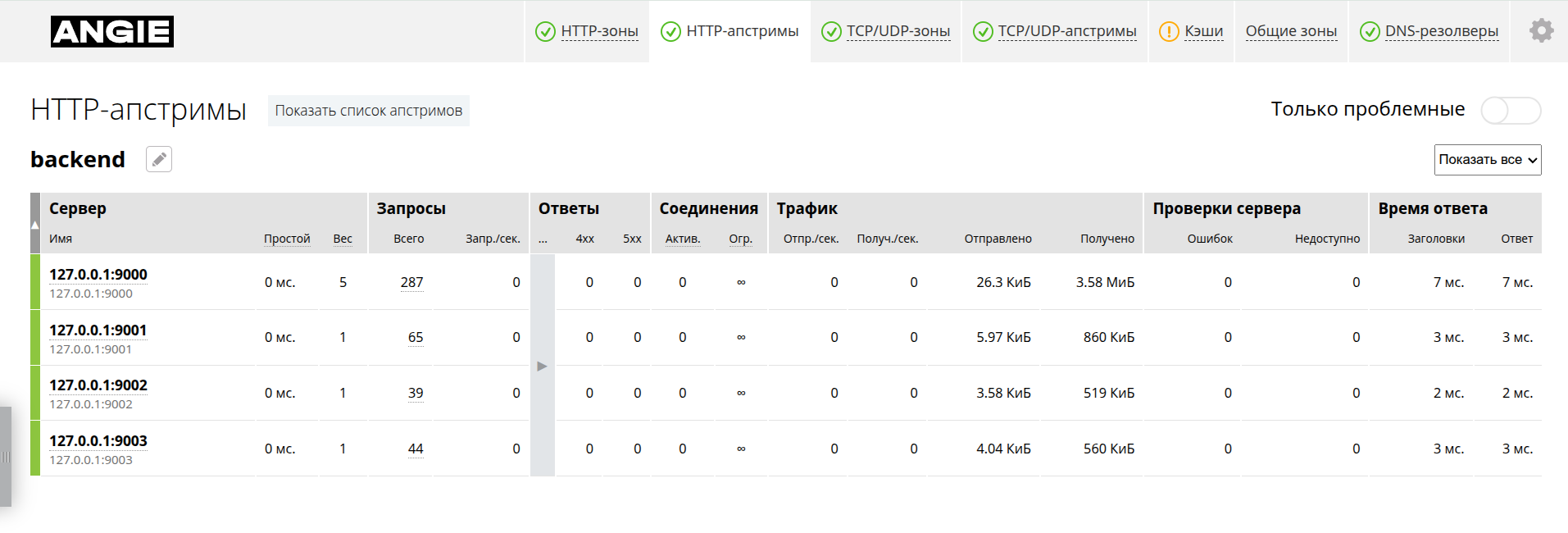
With that, the balancing setup is formally complete. The rest of the article covers configuration details.
Balancing algorithms
In the simplest case, with no extra directives, the balancing algorithm is round-robin. The open version of Angie also offers these methods (directive):
- Least connections (least_conn);
- IP hash (ip_hash);
- Hash (hash);
- Random (random);
- Random least connection (random two).
For all of these methods except hash, no extra configuration is needed; it is enough to specify the directive. For example:
upstream backend {
  zone upstream-backend 10m;
  least_conn;
  server 127.0.0.1:9000;
  server 127.0.0.1:9001;
}
In such a server block, balancing is based on data about the number of active connections to each server. The fewer connections a server has, the more new requests it receives.
The hash method takes a set of variables for computing the hash, as well as a parameter for consistent hashing (consistent). A configuration example that picks a server from the request URI looks like this:
upstream backend {
  zone upstream-backend 10m;
  hash $request_uri consistent;
  server 127.0.0.1:9000;
  server 127.0.0.1:9001;
}
Consistent hashing minimizes client migration between servers when servers are added to or removed from the group.
If the application architecture uses several Angie balancers in front of the same backend servers, the random method is the right choice. It picks a server at random, which makes more even balancing possible under the uncertainty created by multiple balancers. The two parameter changes the behavior: two random servers are picked, and the one with the fewest active connections (least connections) wins. Configuring random two least connections is simple:
upstream backend {
  zone upstream-backend 10m;
  random two;
  server 127.0.0.1:9000;
  server 127.0.0.1:9001;
}
Besides the methods above, Angie can bind a client to a chosen server based on request data. Here is how to set up that binding.
Sticky mode
Angie has four modes for binding a client session to a backend server; the first two are available in the OSS version and the rest in PRO:
sticky cookie;sticky route;sticky learn (PRO);sticky learn with remote action (PRO).
The sticky cookie mode uses a cookie to store information about the server. If the request has no cookie, Angie sets one for the client. It is enough to specify the cookie name and optionally assign the sid parameter for each server. By default, sid is the MD5 hash of the server address and port. For DoS protection, the cookie and route modes also accept a salt and a hashed value through the sticky_secret directive; the cookie value then looks like:
echo -n "<sid><sticky_secret>" | md5sum
Cookie attributes can also be set. A full sticky cookie configuration using sticky_secret is shown below:
upstream backend {
    zone upstream-backend 10m;
    server 127.0.0.1:9000 sid=one;
    server 127.0.0.1:9001 sid=two;
    sticky cookie serv_cook max-age=600;
    sticky_secret sectdss.$remote_addr;
}
Here the cookie is named serv_cook with a 600-second lifetime. The value includes a salt with a variable, and the resulting string is hashed.
The sticky route mode uses request parameters already set by the proxied server, which can be read through Angie variables. These can be a GET parameter, a cookie value, or a request header. For example, configure server selection based on the route request parameter (using an open parameter without sticky_secret may be risky from a DoS vulnerability standpoint):
upstream backend {
    zone upstream-backend 10m;
    server 127.0.0.1:9000 sid=one;
    server 127.0.0.1:9001 sid=two;
    sticky route $arg_route;
}
To check server selection, send requests like:
curl http://localhost/?route=one
curl http://localhost/?route=two
The sticky options above let Angie pick a different server if the one bound to the session is unavailable. This behavior can be disabled by adding the sticky_strict on directive; then, when the bound server is unavailable, the client gets a 502 error.
Several balancing methods and the sticky mode have now been covered, but the parameters of the servers themselves in the upstream block were not changed, so it is time to examine the server directive in detail.
Parameters of the server directive
Each server can have a number of parameters in the server directive (not to be confused with the server block). Not all parameters are available for every balancing mode; here is what they do:
- weight – server weight;
- max_conns – maximum number of simultaneous connections;
- backup – backup server;
- down – unavailable server;
- max_fails – maximum number of failures;
- fail_timeout – time for marking the server unavailable (max_fails);
- resolve — resolve the server name (not only at startup);
- slow_start – gradual ramp-up of the server;
- drain – gradual removal of the server from balancing.
Server weight lets you distribute load unevenly, for example to account for servers with different capacity. A server's share of traffic equals its weight divided by the sum of the weights.
The backup state means the server is only used when all other servers are unavailable. The down parameter excludes requests to the server in any case.
The max_fails and fail_timeout parameters set the number of failures and the time for marking the server unavailable during passive checks. They are also used when bringing the server back into service after a failure.
resolve deserves a separate mention. This mode refreshes server information from DNS. By default, domain names are resolved to addresses when the configuration loads (once). With the resolve parameter and the resolver directive set, Angie refreshes the addresses regularly. That gives the following configuration:
resolver 127.0.0.53 status_zone=resolver;
upstream backend {
  zone backend 1m;
  server test.backend:9000 resolve;
}
resolve can also be used with special DNS records such as SRV, in which case the service name must be specified:
server test.backend.ru service=http resolve;
For this configuration to work, SRV records must be created in DNS for the host _http.tcp.test.backend.ru. SRV records can use priorities and weights, which Angie takes into account.
If the capabilities of the OSS version of Angie are not enough for your tasks, Angie PRO offers an extended feature set.
Angie PRO balancing features
Of course, Angie PRO supports all the capabilities of the open version, plus additional balancing algorithms and modes.
The algorithms in the PRO version:
- Least Time — by server response time;
- Feedback — arbitrary parameters used as feedback from the server.
These algorithms account for the diversity of request load more precisely and distribute work across servers more accurately.
There are also additional balancing-related features:
- dynamic management of server statuses through the API and Console Light;
sticky learnandsticky learn with remote actionsession binding modes — the latter allows centralized session storage;- active server checks (the
upstream_probemodule); - switching to a backup server group (
backup_switch); - storing server state in a file (
state); - request queues to servers (
queue); - binding the client connection to the server connection (
bind_conn).
These features are most likely to be in demand at high traffic volumes and with complex application architectures.
Summary
The article covered the main Angie capabilities for balancing HTTP traffic. For the most common configurations, examples showed how to set up a server group and possible ways to adapt it to application requests. As usual, the remaining configuration details can be found in the documentation.