
You have probably heard about the new HTTP versions — 2 and 3. What is behind them? Why were they developed? How do they differ from classic HTTP/1.1, and where can they help? What settings does the Angie web server expose for these protocols? This article covers all of these questions.
Let's start with a brief history of the HTTP protocol.
Video version
A video version of this article is available on YouTube.
The first versions of HTTP
HTTP (HyperText Transfer Protocol) appeared as a way to transfer text data when the WWW (World Wide Web) — the web — was born.
The first version, HTTP/0.9 (1991), was as simple as possible: a single-line protocol, no request or response headers, and a single content type (text).
The next version, HTTP/1.0 (1996), added support for headers, response codes, version indication, and other capabilities. But this version was transitional: features were added as browsers and servers evolved, so there was no strict standard.
HTTP/1.1 (1997) brought additional capabilities and, at the same time, a standard that web servers and clients could follow. The most important features of this version:
- chunked encoding;
- cache control through headers;
- content negotiation;
- mandatory use of the Host header;
- additional methods (PUT, PATCH, DELETE, CONNECT, TRACE, OPTIONS).
HTTP/1.1 is still a full-featured version that meets the needs of most web applications. With TLS (HTTPS) in the picture, we can run virtually any site on HTTP/1.1 and everything will work. That raises the natural question: why were versions 2 and 3 developed? Short answer: to make sites load faster. The main problem with HTTP/1.1 was the lack of request multiplexing (the standard had support for pipelining, but it never became widespread in software). To work around this limit, browsers opened many parallel TCP connections to the server and loaded content in several streams. We look at what versions 2 and 3 offer below.
HTTP/2
HTTP/2 (2015) was built on SPDY/3.1, a Google development. HTTP/2 brought several new capabilities:
- request multiplexing;
- header compression (HPACK);
- request prioritization;
- connection reuse;
- an internal binary representation;
- Server Push.
When it was rolled out, a de facto requirement to use TLS emerged (the H2 designation), even though the standard also defines an open version of the protocol (without encryption — H2C).
The new capabilities looked impressive. Enthusiasts found uses for these features and measured the effect. Optimizing site load times became easier: domain sharding (splitting a site's resources across several domains) could now be dropped — indeed, it should be dropped — and combining resources and inlining became less critical.
But not all HTTP/2 features worked as intended. Server Push, for example, never made it to production use, because it conflicted with the idea of caching resources and could cause excess load on the channel. Resource prioritization largely failed as well, primarily because of head-of-line blocking at the TCP transport layer. On top of that, standard TCP (with the cubic congestion control algorithm) is extremely sensitive to packet loss on the link. HTTP/2 with a single TCP connection became more vulnerable in this respect compared with HTTP/1.1, where the browser opened up to 6 parallel connections to the server. One attempt to solve this problem was the TCP BBR algorithm, but it in turn created additional problems for other network participants.
Rolling the new protocol into web servers also went anything but smoothly. First, HTTP/2 support appeared in the mainline version of Nginx; implementation bugs and protocol problems (including vulnerabilities) were fixed on a regular basis. Such problems stem mainly from the protocol's high complexity and the need to test compatibility with various clients, browsers first of all. Today HTTP/2 in Angie has stable protocol status and is fit for production use.
As usual, the next version of the protocol was proposed to solve HTTP/2's problems: HTTP/3.
HTTP/3
Like its predecessor, HTTP/3 (2022) was based on a protocol developed by Google (QUIC) and has the short designation h3. For the first time in HTTP history, the transport protocol changed: from TCP to UDP. Flow control and delivery reliability therefore moved from the OS kernel to the application layer. The new UDP-based transport protocol was named QUIC, and HTTP/3 already runs on top of it. Overall, the changes compared with HTTP/2 were few:
- the move to the QUIC transport;
- mandatory built-in TLS encryption;
- fuller encryption of data in transit;
- connection establishment without delays (0-RTT handshake);
- connection migration.
Moving to the UDP transport opened up the possibility of finer traffic control at the application layer and potentially simpler protocol upgrades. And of course, UDP makes it easier to deal with head-of-line blocking. There were downsides too: using UDP and the new transport adds overhead in server compute resources. After all, operating systems and network devices have traditionally optimized TCP as the main transport for heavy traffic.
Connection migration lets the connection state survive a network switch, which is especially useful for mobile devices.
According to Cloudflare statistics, HTTP/2 is the main protocol for delivering site content (a share of about 60%), while HTTP/3 usage is still lower (a share of about 30%).
Support for HTTP/2 and HTTP/3 at the time of writing is quite high, and the same applies to support in popular browsers. If you are not familiar with HTTPS setup in Angie, review the TLS setup article in this series first. This is a good point to move on to configuring the new HTTP versions in the Angie web server.
Setting up HTTP/2
Before enabling HTTP/2, recall the ALPN mechanism (Application-Layer Protocol Negotiation), which lets a client and server agree on HTTP/2 support and start using it. During the TLS handshake the client and server exchange their capabilities, and HTTP/2 (h2) support is one of them. ALPN is supported in OpenSSL starting from version 1.0.2. Your system most likely ships a newer version of this library, but keep it in mind.
So HTTP/2 support requires no extra modules — just add the http2 directive:
server {
  listen 443 ssl;
  http2 on;
  ...
}
Basic setup can stop here. What remains is to verify the protocol works, for example with the browser's developer tools or by inspecting the server logs.
The module does, however, expose some extra parameters that affect how the protocol behaves.
The first setting is the number of parallel streams in an HTTP/2 connection. The default is 128, which is enough for the overwhelming majority of cases. You can tune this number for research purposes — to estimate the effect on load times, or to set stricter limits for DoS protection. One more unpleasant difference in how H2/H3 behave compared with HTTP/1.1 shows up here: the new protocols create only one connection per client, and that connection is handled by a single Angie worker process. Old HTTP/1.1, using several connections, spreads the load across several worker processes even for a single client. The default setting (valid in the http and server contexts):
http {
  http2_max_concurrent_streams 128;
}
The second setting controls the internal size of the chunks the response body is split into. The default is 8 KB. Increasing this setting reduces overhead, but hurts request prioritization. There is also TLS-level buffering to account for (the ssl_buffer_size directive, 16 KB by default) — factor it in while tuning. The response chunk size setting:
http {
  http2_chunk_size 8k;
}
You can also adjust the various buffer sizes for the request body (http2_body_preread_size) and the worker process (http2_recv_buffer_size). The module has several settings for the Server Push mechanism, but there is no point reviewing them, because Server Push support has been removed from the server code. This is a good point to move on to HTTP/3 configuration.
Setting up HTTP/3
Start with the SSL library requirements. Using HTTP/3 requires TLS 1.3 support, so the OpenSSL version must be at least 1.1.1. If you plan to use 0-RTT handshakes, the OpenSSL version must be 3.5.1 or above. Other libraries are also acceptable.
The Nginx HTTP/3 implementation started as a separate branch of experimental code and only later reached stable status. The Angie implementation differs substantially from Nginx. First of all, it uses the BPF mechanism (the developers describe it in a separate article) and it supports HTTP/3 when connecting to upstreams.
Compared with HTTP/2, version 3 requires more preparation of the environment. First, H3 runs over UDP, which means making sure there are no blocks at the network filter level for the UDP/443 port. Second, switching to HTTP/3 requires creating a separate connection, so the ALPN negotiation mechanism will not help here. From this it follows that enabling HTTP/2 as a fallback for the server is a good idea. There are two principal ways to tell the client that the server supports HTTP/3: the Alt-Svc header and HTTPS records in DNS. They can be used separately or all at once. Let's start with the general HTTP/3 settings.
quic_bpf on;

http {
  quic_gso on;
  quic_retry on;
  ssl_early_data on;
  http3_max_concurrent_streams 128;
  ...
}
The quic_bpf directive (specified only in the main context) lets you route QUIC packets with eBPF; it requires Linux kernel version 5.7 or above. The developers describe this in a separate article.
Inside the http context, the quic_gso directive enables the GSO (Generic Segmentation Offloading) optimization in Linux, which reduces the load on the server's CPU. This optimization must be supported by the network card and be active. You can check this with ethtool.
# ethtool -k enp4s0 | grep generic
    tx-checksum-ip-generic: off [fixed]
generic-segmentation-offload: on
generic-receive-offload: on
The next directive, quic_retry, enables the client address validation mechanism to prevent amplification attacks (QUIC Address Validation). Next, we allow the 0-RTT handshake (ssl_early_data on); here the application must be prepared for possible replay attacks.
Finally, we see the http3_max_concurrent_streams directive we already know from HTTP/2. It has the same meaning as in HTTP/2 and is likewise set by default to a sufficient number of streams. Those were the general Angie settings; now let's look at a site configuration using HTTP/3.
server {
  listen 443 ssl;
  listen 443 quic reuseport;
  http2 on;
  ...
  add_header Alt-Svc 'h3=":443"; ma=86400';
}
In this example we run HTTP/2 and HTTP/3 side by side. Note the listen 443 quic reuseport directive. It opens a socket on port UDP/443 with the reuseport option (it can be used only once per socket in the server configuration).
To switch to HTTP/3 we advertise its support in the Alt-Svc response header. We state that the protocol is available on port 443 (UDP) and allow this header to be cached for a day. Use such a header with care (after testing), because once HTTP/3 is disabled on the server, clients that received the header earlier will try to connect straight to UDP/443 and get an error. On the first connection a session starts with an HTTP/2 connection (the first requests); then the client receives the header and, if the connection succeeds, switches to HTTP/3.
We can additionally advertise HTTP/3 support with an HTTPS record in DNS. For example, this one:
example.com 3600 IN HTTPS 1 . alpn="h3,h2"
In this record we specified HTTP/2 and HTTP/3 support for the domain example.com. Modern browsers query for the presence of an HTTPS record before connecting to the server. However, even having the record does not guarantee HTTP/3 operation from the first request: the client may connect over HTTP/2 and the first requests will use that version, after which the browser will establish an HTTP/3 connection and the following requests will already run over HTTP/3.
As we said above, HTTP/3 is meant for communication between the client and the server, but Angie also implements HTTP/3 support for proxied servers. Let's see how this feature can be used.
HTTP/3 with upstreams
To use HTTP/3 when connecting to a proxied server, it is enough to specify the protocol version on the connection. It also makes sense to use keepalive connections to use the connection more efficiently. A typical configuration looks like this:
upstream backend {
    server 127.0.0.1:8080;
    keepalive 16;
}

server {
    ...
    location / {
        proxy_pass https://backend;
        proxy_http_version 3;
        proxy_ssl_name $host;
        proxy_ssl_server_name on;
        proxy_set_header Connection "";
        proxy_ssl_protocols TLSv1.3;
        ...
    }
}
The main directive that enables HTTP/3 toward the upstream is proxy_http_version 3. As in the main HTTP/3 module, you can adjust the number of parallel streams (proxy_http3_max_concurrent_streams) and the QUIC read/write buffer size (proxy_http3_stream_buffer_size).
For the overwhelming majority of applications, HTTP/1.1 with keepalive when connecting to upstreams is the optimal choice. H3 can be used in those rare cases where the backend does not support HTTP/1.1 or where the outgoing connection must run over UDP specifically.
What results can you expect from the new HTTP versions?
We have already covered what the new HTTP versions offer; they were aimed at making sites load faster. But how much speed can you actually gain just by switching protocols?
Split the answer into two parts. The first aspect is web server performance. From this point of view the new protocols are harder to process: they include header compression, require keeping state, and therefore degrade performance (by various accounts, 20–30%). At the same time there is a positive effect: fewer connections toward clients. With HTTP/2 we get one TCP connection from a client instead of six with HTTP/1.1; for HTTP/3 it will be one UDP connection. The number of expensive TLS handshake operations also goes down.
The second aspect is site load speed in the browser under real network conditions. Here the new protocols realize their potential and do provide a speedup. In most cases we can count on improved start-of-render page metrics. Do not expect a radical improvement, but a positive effect will be there in almost every case. The main source of improvements is exactly the request multiplexing capability — sending requests without waiting for responses and lifting the limit of 6 parallel streams.
To compare the current state of the protocols objectively, numerous tests were run on five real sites using the WebPageTest system. Test conditions: current Chrome browser version, the 3GFast network profile (150 ms latency, 1.6 Mbit/s download bandwidth), 10 runs for each page. A typical comparison result for timing metrics is shown in the image below.
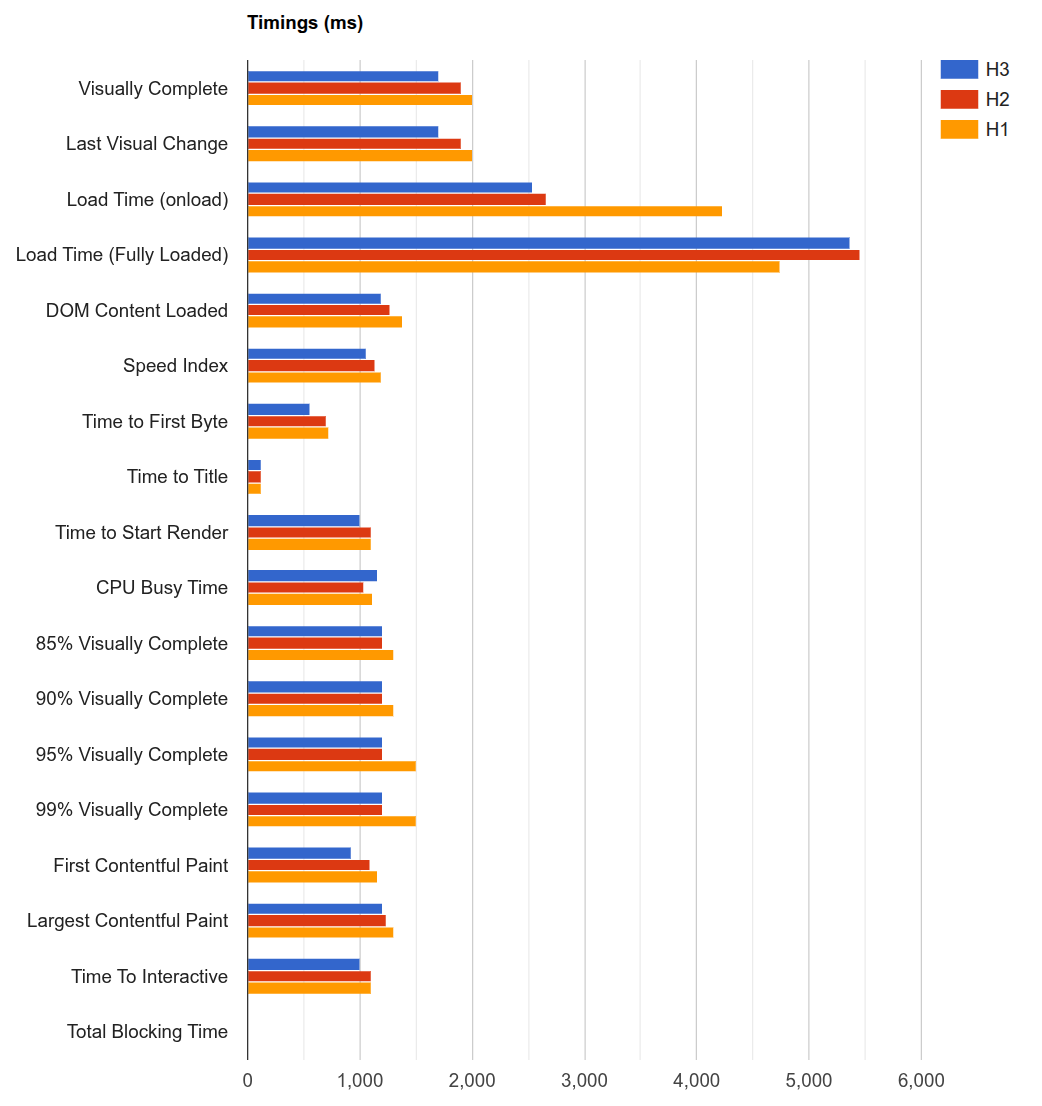
As the image shows, most metrics win from using HTTP/2 and HTTP/3, and HTTP/3 is usually better than HTTP/2. It is also noticeable that there is no radical improvement on practically every metric (except Load Time (onload), but that is not a very stable metric). Nor is there the reverse situation where the new protocols cause a noticeable speed degradation. One exception is the situation (described in the TLS setup article in this series) with Kernel TLS and HTTP/2, where HTTP/2 lost badly in the large-file delivery scenario with SSL_sendfile(). It should also be said that when testing on a link with packet loss, HTTP/2 can look considerably worse than the other versions.
These are the results you can expect for an average real-world site. The difference between HTTP/1.1 and the new versions may be larger if you skip optimization techniques for the old protocol altogether. But HTTP/1.1 has existed for decades and is so entrenched that resource bundling — which reduces the number of requests and therefore the effect of request multiplexing — can be found practically everywhere. The effect of header compression may only be noticeable in cases with a large volume of headers (cookies) in the total traffic. As for traffic as a whole, H2/H3 add about 4–6% to the total volume compared with HTTP/1.1 — that is the overhead of running the new protocols.
Request prioritization deserves a separate note: it really will work better in HTTP/3. This effect can be seen on pages with a large number of images. There the browser can set the correct priority, and the protocol will deliver first the images that are on the first screen.
Summary
The new versions of the HTTP protocol are already actively used today and benefit users. Their potential is surely not fully realized, but software — both client-side (browsers) and server-side (web servers, load balancers) — keeps improving. We covered the evolution of the HTTP protocol and how to configure HTTP/2 and HTTP/3 in the Angie server. Whether to use the new versions for your projects is an individual decision, but knowing how they work is always useful.