
Earlier articles in this series covered load balancing with Angie (HTTP and L4), but they skipped fault tolerance. The load balancer becomes a single point of failure for the system, and that problem has to be solved. One solution is to use the VRRP protocol to build a fault-tolerant cluster — that is what this article covers.
Video version
A video version of this article is available on YouTube.
The VRRP protocol
Start with how VRRP (Virtual Router Redundancy Protocol) works. As the name suggests, it was designed to improve router availability — it comes from networking. The core of the protocol is a dedicated virtual IP (Virtual IP — VIP) that migrates from one device to another during failures and failovers.
To run the protocol, you define a group of devices (a virtual router) that the virtual address (VIP) belongs to. After the system starts, one device becomes the leader and owns the VIP (the master role); the rest are backups. The current master sends VRRP advertisement packets on the network. If the other nodes stop receiving these advertisements, the VIP failover to a backup device begins.
A few more VRRP terms the setup will use. VRID — virtual router ID — identifies the virtual router; all servers in one group must share the same VRID value. Priority is a value from 0 to 255 used to elect the master router. The server with the highest priority wins. There are also several timing parameters:
- advertisement interval — the time between advertisement sends;
- master down interval — the time after which a backup router becomes the master router;
- skew time — the time (in seconds) used to offset the master down interval (to avoid races during re-elections).
The preempt mode controls whether a backup router with a higher priority will try to take over the master role from the current master router with a lower priority once it recovers.
There are two main versions of VRRP — 2 and 3. The main differences: version 3 supports IPv6, has higher timer resolution (milliseconds versus seconds in v2), and dropped authentication. This solution uses the Keepalived server as a popular VRRP implementation on Linux.
Keepalived, a VRRP implementation
Keepalived offers a range of load balancing and failover features. It uses the VRRP and BFD protocols and IPVS (Linux Virtual Server) components. This article uses its server failover functionality to provide fault tolerance based on VRRP.
In Keepalived terms, the setup creates a virtual router with two servers sharing one virtual IP. Each server runs an Angie server, and Keepalived checks its availability.
The overall diagram is shown below.
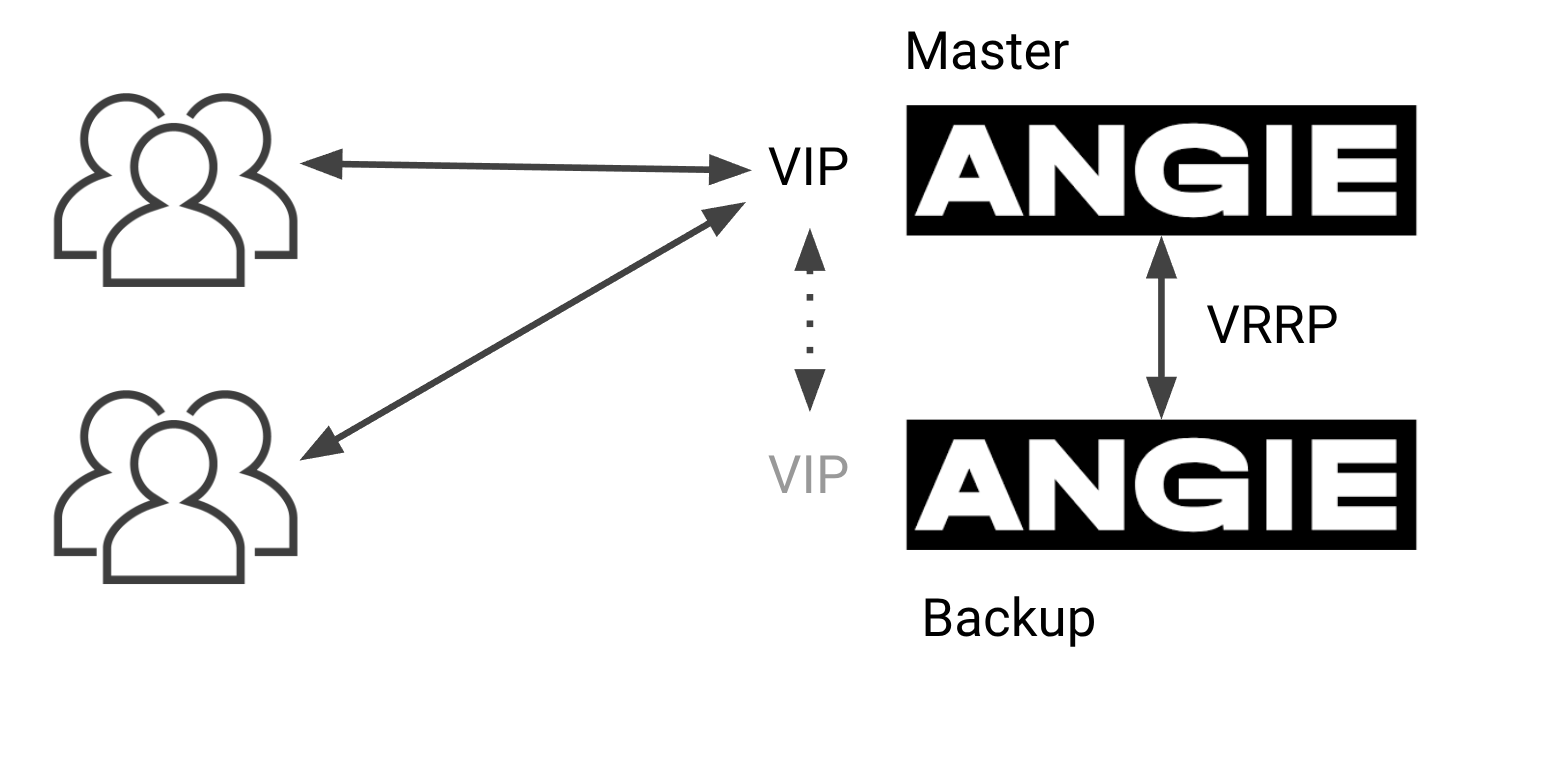
Clients connect to the VIP, which belongs to one of the servers. That server's role is Master. The second server sits in the Backup state and, if the first server fails, takes the VIP to serve client requests. The servers communicate continuously over VRRP, so one failure mode is the absence of messages from the Master server. The second failure mode is a failed Angie health check on the Master server; in that case the Master lowers its priority and hands the master role (and the VIP) to the other server.
Setting up the test lab
The test lab runs on two virtual machines with Ubuntu 24.04, Keepalived 2.2.8, and Angie 1.10.2. By default, every step is applied identically on both machines; configuration differences are called out separately.
Configure the Angie repository and install the required packages (run all the following commands as root):
apt install -y angie angie-console-light keepalived
Modify the default Angie server configuration (/etc/angie/http.d/default.conf). Add a location for basic server availability checks and a header in the root location:
    location / {
       add_header X-Front "Angie-1";
        root   /usr/share/angie/html;
        index  index.html index.htm;
    }

    location /health_check/ {
       return 200 "OK";
        allow   127.0.0.1;
        deny    all;
    }
The Angie health check runs at http://127.1/health_check/. The response uses the simplest return directive and needs no significant resources to process.
Check and reload the Angie configuration:
angie -t && systemctl reload angie
Now to the Keepalived configuration. Its default config ships as a template (/etc/keepalived/keepalived.conf.sample). It shows some configuration directives, but for this task it is easier to create a config from scratch. The Keepalived configuration is where the only difference between the servers appears (state MASTER or BACKUP). Create /etc/keepalived/keepalived.conf with the following content:
global_defs {
  enable_script_security
}

vrrp_script chk_angie {
  script "/etc/keepalived/check_angie.sh"
  user angie
  interval 1
  rise 2
  fall 2
  timeout 1
  weight 2
}

vrrp_instance VI_1 {
  interface enp1s0
  state MASTER
  virtual_router_id 1
  priority 101

  virtual_ipaddress {
    192.168.122.81
  }

  track_script {
    chk_angie
  }

  authentication {
    auth_type PASS
    auth_pass spass
  }
}
A look at the main elements of this Keepalived config.
The first section (global_defs) holds global settings for the whole server. Here it forbids running check scripts as root when the file is writable by regular users.
The vrrp_script section defines how the Angie server is checked for availability. The script lives in an external file, runs as the Angie user with a one-second interval. The script has a timeout (1 second) and a number of attempts to mark the server as working (rise) or down (fall). The weight parameter (weight 2) sets how much the priority increases when the script succeeds.
The next section (vrrp_instance) describes the core piece — our server's instance in the virtual router. It specifies the interface the VIP binds to (enp1s0), the default state (MASTER), the virtual router ID (virtual_router_id), and the initial priority. The section also contains configuration blocks for the virtual address (virtual_ipaddress), the check script (track_script), and authentication (authentication). The check script section refers to the vrrp_script block defined earlier by name. Authentication is optional and only supported by version 2 of the protocol. With IPv6 addresses, Keepalived uses VRRPv3.
The configuration of the second machine is fully identical except for a few directives in the vrrp_instance section. There you can set a different priority and initial role for the server:
vrrp_instance VI_1 {
  ...
  state BACKUP
  priority 100
  ...
To track which server is active, you can also change the add_header directive in the Angie configuration to a different value (Angie-2).
After configuring all components on both machines, check that the Keepalived configuration works:
systemctl reload keepalived
systemctl status keepalived
The Keepalived status output shows the latest log messages. If that is not enough, check the log separately:
journalctl -u keepalived -n 20 --no-pager
There you can see the check script status and the server moving into the MASTER or BACKUP role.
Oct 30 13:01:15 angie-vrrp1 Keepalived_vrrp[32351]: (VI_1) Entering BACKUP STATE (init)
Oct 30 13:01:15 angie-vrrp1 Keepalived_vrrp[32351]: VRRP_Script(chk_angie) succeeded
With all services running on both machines, the failover tests can start.
Testing failover
To confirm the failover scheme works correctly, check several scenarios.
In the first scenario, the MASTER machine drops off the network (you can power it off or stop the network interface). The VIP must move to the second machine. To estimate the failover time (VIP unavailability), use a high-frequency ping (with the ‑f flag). Test from the host system (the cluster runs in virtual machines). Start ping and power off the MASTER machine:
host> sudo ping -f 192.168.122.81

PING 192.168.122.81 (192.168.122.81) 56(84) bytes of data.
........................................................
--- 192.168.122.81 ping statistics ---
838608 packets transmitted, 838552 received, 0.00667773% packet loss, time 26040ms
rtt min/avg/max/mdev = 0.014/0.019/2.007/0.005 ms, ipg/ewma 0.031/0.023 ms
As you can see, powering off the MASTER system cost about 50 packets — that is the failover delay. The send rate was about 32 kPps.
Start the first machine again; it regains the MASTER role.
In the second scenario, stop the Angie service to simulate a web server failure. To test availability, run a stream of HTTP requests from the host system to the VIP with ab, and stop Angie on the MASTER machine at the same time:
host> ab -n 10000000 -l -c 10 -r http://192.168.122.81/
...
Complete requests:      316002
Failed requests:        62179
   (Connect: 0, Receive: 31091, Length: 0, Exceptions: 31088)
Total transferred:      227074067 bytes
HTML transferred:       155561406 bytes
Requests per second:    22440.70 [#/sec] (mean)
...
The test results show about 62 thousand requests failed. The average rate was 22 KRps, so the service was unavailable for about three seconds. Looking at the Angie check script settings, it is marked unavailable after two failed checks with a one-second check interval.
The Keepalived logs on the MASTER machine show the event timeline — about four seconds from check to failover:
Oct 30 16:03:01 angie-vrrp1 Keepalived_vrrp[859]: Script `chk_angie` now returning 7
Oct 30 16:03:02 angie-vrrp1 Keepalived_vrrp[859]: VRRP_Script(chk_angie) failed (exited with status 7)
Oct 30 16:03:02 angie-vrrp1 Keepalived_vrrp[859]: (VI_1) Changing effective priority from 103 to 101
Oct 30 16:03:05 angie-vrrp1 Keepalived_vrrp[859]: (VI_1) Master received advert from 192.168.122.26 with higher priority 102, ours 101
Oct 30 16:03:05 angie-vrrp1 Keepalived_vrrp[859]: (VI_1) Entering BACKUP STATE
One more scenario: a failure of the Keepalived service itself does not cause noticeable downtime, since both systems are available and can serve requests. The VIP moves to the BACKUP server with minimal losses.
So the possible service downtime has been estimated for several scenarios. Keep in mind that in real conditions, moving traffic from one load balancer to another breaks TCP connections and resets state that is local to each load balancer: proxied server state, session affinity, cache, and other server state elements. With a correct application architecture and testing of different failure scenarios, this solution is quite viable.
Syncing configuration across cluster nodes
Angie has a dedicated package that automates configuration file synchronization: angie‑ha‑sync. It keeps configs up to date on all nodes. The official documentation page also describes how to set up nodes to work with VRRP.
Summary
This article covered the basics of how the VRRP protocol works and how to use it for a fault-tolerant cluster built on Keepalived and Angie. The configuration used an architecture with one active and one standby server. After the setup was complete, several failure scenarios were tested along with their impact on service availability.