
Text compression has long been a standard practice in web applications. Shrinking the amount of data cuts transfer time and lowers the load on the network channel. Compression setup, however, often comes down to dynamic gzip and default settings. This article takes a deeper look at compression. First, a quick review of the main compression technologies available on the web.
Video version
For convenience, a video version of this article is available on YouTube.
Compression options for the web
Several formats solve the problem of compressing text resources, and they all have reasonably wide support in browsers and other clients:
gzip, deflate— the traditional compression format with the broadest support;brotli (br)— a newer format optimized for high compression ratios;Zstandard (zstd)— a newer format optimized for high compression and decompression speed.
In the context of a web server, Angie ships with a built-in module for gzip and third-party modules for brotli and zstd. Alongside the compression algorithms there are two modes: dynamic and static. Dynamic compression means compressing the response in real time, while the request is being processed. In this mode CPU resources are spent on every request. Static compression means creating compressed copies of resources on disk; serving a response only requires reading that copy from disk and sending it over the network. CPU resources are then used once (when the compressed copy is created) — not during request processing, but when the resource is published (or the static build runs).
Choosing settings for static compression is straightforward: use the maximum compression settings (CPU cost does not matter) and the format with the best compression ratio. Skipping ahead, that will be brotli at compression level 11 (the maximum). Static compression should of course be used everywhere possible. Also remember file minification where it applies: minification improves file size even when compression is used.
With dynamic compression, the choice of algorithm and compression settings is less obvious. A comparative test will help make that choice.
Testing the compressors
The topic of web compressors was covered earlier, in an article on text compression. The focus of that article was on applying compression modules in Angie. Now it is time to return to the question of choosing the optimal compression level and compressor, accounting for the costs of transferring, compressing, and decompressing the text resource. To make an informed choice, different compressors need to be compared under identical conditions, on a dataset close to real-world data.
As a benchmark, the open-source project lzbench will be used. It makes it easy to compare the speed of all the options of interest (brotli, zstd, gzip) and presents the results in a convenient form. As test data, large files with HTML, CSS and JS code are used (1 MB and up). The HTML file comes from the Silesia corpus (file webster, 40.5 MB). The CSS and JS files were taken from a real site and are 1.0 MB and 1.8 MB respectively. The lzbench benchmark is highly repeatable and uses current library versions. Its results agree well with testing the compression modules in the Angie server. The benchmark always uses a single CPU core, which suits the purpose. The CPU also has a high clock frequency, so expect lower absolute numbers on server-class systems.
Test conditions:
- current
lzbench(built from source); zlib 1.3.1;brotli 1.2.0;zstd 1.5.7;- CPU: AMD Ryzen 5800x;
- OS: Ubuntu 24.04.
- Virtualization: KVM.
The tests were run with the following command (only the file was changed):
./lzbench -o4 -ezlib/brotli/zstd 1.css
The parameters request a test of the three libraries of interest and enable CSV output format for easy import into a spreadsheet, where the analysis takes place. The output is three datasets (one per file) that need to be analyzed. The source files and results are in the repository.
Test results
The first test runs on the HTML file, webster (40.5 MB). The first column lists the compressor, its version, and the compression level. The second column shows the compression speed in MB/s, the third the decompression speed. The fourth column is the resulting compression ratio as a percentage of the original file size. Let's look at the table in detail.
| Compressor name/level | Compression speed (MB/s) | Decompression speed (MB/s) | Ratio (%) |
| zlib 1.3.1 -1 | 141,53 | 469,47 | 36,16 |
| zlib 1.3.1 -2 | 124,57 | 489,41 | 34,37 |
| zlib 1.3.1 -3 | 91,49 | 508,62 | 32,87 |
| zlib 1.3.1 -4 | 82,58 | 485,64 | 31,36 |
| zlib 1.3.1 -5 | 55,63 | 483,93 | 30,02 |
| zlib 1.3.1 -6 | 37,88 | 496,23 | 29,46 |
| zlib 1.3.1 -7 | 30,07 | 499,30 | 29,26 |
| zlib 1.3.1 -8 | 22,15 | 499,57 | 29,12 |
| zlib 1.3.1 -9 | 22,35 | 498,03 | 29,12 |
| brotli 1.2.0 -0 | 390,89 | 477,73 | 35,12 |
| brotli 1.2.0 -1 | 261,08 | 500,91 | 32,47 |
| brotli 1.2.0 -2 | 159,45 | 577,52 | 30,54 |
| brotli 1.2.0 -3 | 134,31 | 591,11 | 29,95 |
| brotli 1.2.0 -4 | 96,70 | 710,89 | 26,51 |
| brotli 1.2.0 -5 | 64,60 | 722,73 | 25,57 |
| brotli 1.2.0 -6 | 51,59 | 750,83 | 24,81 |
| brotli 1.2.0 -7 | 32,91 | 767,46 | 24,18 |
| brotli 1.2.0 -8 | 23,35 | 783,15 | 23,74 |
| brotli 1.2.0 -9 | 16,98 | 783,95 | 23,42 |
| brotli 1.2.0 -10 | 2,01 | 667,99 | 21,53 |
| brotli 1.2.0 -11 | 0,86 | 780,11 | 21,20 |
| zstd 1.5.7 -1 | 461,38 | 1 741,48 | 32,95 |
| zstd 1.5.7 -2 | 340,35 | 1 487,24 | 30,89 |
| zstd 1.5.7 -3 | 256,96 | 1 442,12 | 29,18 |
| zstd 1.5.7 -4 | 251,40 | 1 408,85 | 28,72 |
| zstd 1.5.7 -5 | 155,57 | 1 441,32 | 27,05 |
| zstd 1.5.7 -6 | 108,97 | 1 562,15 | 26,07 |
| zstd 1.5.7 -7 | 94,76 | 1 590,28 | 25,46 |
| zstd 1.5.7 -8 | 72,15 | 1 665,88 | 25,13 |
| zstd 1.5.7 -9 | 68,14 | 1 668,06 | 24,74 |
| zstd 1.5.7 -10 | 49,19 | 1 697,94 | 24,26 |
| zstd 1.5.7 -11 | 33,73 | 1 728,61 | 23,97 |
| zstd 1.5.7 -12 | 30,87 | 1 727,13 | 23,92 |
| zstd 1.5.7 -13 | 12,44 | 1 743,87 | 23,74 |
| zstd 1.5.7 -14 | 10,61 | 1 771,26 | 23,39 |
| zstd 1.5.7 -15 | 6,92 | 1 768,72 | 23,04 |
| zstd 1.5.7 -16 | 5,83 | 1 718,46 | 22,10 |
| zstd 1.5.7 -17 | 4,24 | 1 715,33 | 21,54 |
| zstd 1.5.7 -18 | 3,16 | 1 698,01 | 21,23 |
| zstd 1.5.7 -19 | 2,79 | 1 677,18 | 20,93 |
| zstd 1.5.7 -20 | 2,35 | 1 397,29 | 20,45 |
| zstd 1.5.7 -21 | 2,27 | 1 407,57 | 20,34 |
| zstd 1.5.7 -22 | 2,20 | 1 384,54 | 20,34 |
Table 1. Test results for HTML.
The absolute leader in compression speed is zstd -1, followed by brotli -0. At the same time, zstd at low compression settings reaches a good ratio. Overall, zlib (gzip) shows a complete failure: both in speed and in compression ratio. High compression settings for brotli (10–11) and zstd (14–22) are clearly unsuitable for dynamic compression because of their low speed. As for decompression, it barely varies within a single library and stays consistently high; the absolute leader in this category is zstd. Note that decompression of the resource will most likely be done by the client, and the library it uses may differ.
For static compression, the results hold a surprise: the winner is zstd -22. brotli usually wins this category, but for this large file (over 40 MB) zstd turned out best.
Let's see whether the picture changes with CSS compression.
| Compressor name/level | Compression speed (MB/s) | Decompression speed (MB/s) | Ratio (%) |
| zlib 1.3.1 -1 | 101,35 | 507,15 | 39,58 |
| zlib 1.3.1 -2 | 97,59 | 516,27 | 38,84 |
| zlib 1.3.1 -3 | 91,37 | 527,28 | 38,33 |
| zlib 1.3.1 -4 | 75,97 | 590,57 | 36,61 |
| zlib 1.3.1 -5 | 67,64 | 600,61 | 35,97 |
| zlib 1.3.1 -6 | 56,54 | 608,52 | 35,74 |
| zlib 1.3.1 -7 | 51,55 | 607,71 | 35,68 |
| zlib 1.3.1 -8 | 44,51 | 608,58 | 35,67 |
| zlib 1.3.1 -9 | 44,06 | 607,95 | 35,67 |
| brotli 1.2.0 -0 | 648,31 | 694,81 | 39,11 |
| brotli 1.2.0 -1 | 511,76 | 716,54 | 37,66 |
| brotli 1.2.0 -2 | 295,42 | 734,87 | 36,57 |
| brotli 1.2.0 -3 | 257,88 | 766,68 | 36,02 |
| brotli 1.2.0 -4 | 192,31 | 801,25 | 35,47 |
| brotli 1.2.0 -5 | 130,44 | 814,85 | 34,67 |
| brotli 1.2.0 -6 | 115,28 | 826,24 | 34,43 |
| brotli 1.2.0 -7 | 95,35 | 834,93 | 34,24 |
| brotli 1.2.0 -8 | 78,68 | 840,74 | 34,12 |
| brotli 1.2.0 -9 | 33,36 | 842,3 | 34,04 |
| brotli 1.2.0 -10 | 2,75 | 458,94 | 33,16 |
| brotli 1.2.0 -11 | 1,08 | 466 | 33,02 |
| zstd 1.5.7 -1 | 832,85 | 1777,62 | 38,31 |
| zstd 1.5.7 -2 | 739,07 | 1686,06 | 37,46 |
| zstd 1.5.7 -3 | 632,15 | 1702,85 | 36,29 |
| zstd 1.5.7 -4 | 610,81 | 1679,72 | 36,28 |
| zstd 1.5.7 -5 | 292,53 | 1819,12 | 35,13 |
| zstd 1.5.7 -6 | 226,18 | 1877,61 | 34,73 |
| zstd 1.5.7 -7 | 204,83 | 1923,58 | 34,53 |
| zstd 1.5.7 -8 | 166,53 | 1945,69 | 34,43 |
| zstd 1.5.7 -9 | 161,21 | 1946,21 | 34,42 |
| zstd 1.5.7 -10 | 136,01 | 1980,51 | 34,29 |
| zstd 1.5.7 -11 | 96,99 | 1968,38 | 34,19 |
| zstd 1.5.7 -12 | 99,46 | 1966,44 | 34,19 |
| zstd 1.5.7 -13 | 48,36 | 1963,91 | 34,12 |
| zstd 1.5.7 -14 | 40,79 | 1975,87 | 34,03 |
| zstd 1.5.7 -15 | 36,51 | 1978,59 | 34 |
| zstd 1.5.7 -16 | 17,74 | 1986,73 | 33,64 |
| zstd 1.5.7 -17 | 15,93 | 1962,93 | 33,6 |
| zstd 1.5.7 -18 | 9,35 | 1890,08 | 33,58 |
| zstd 1.5.7 -19 | 6,57 | 1900,55 | 33,46 |
| zstd 1.5.7 -20 | 6,61 | 1899,66 | 33,46 |
| zstd 1.5.7 -21 | 6,17 | 1908,84 | 33,45 |
| zstd 1.5.7 -22 | 5,22 | 1904,06 | 33,45 |
Table 2. Test results for CSS.
Here maximum brotli compression takes its place as the absolute leader in compression ratio.
In dynamic mode (low levels) everything stays as in the previous test: zstd leads in speed and compression quality, with brotli following at a clear distance behind in speed.
Finally, let's complete the picture with the JS file results.
| Compressor name/level | Compression speed (MB/s) | Decompression speed (MB/s) | Ratio (%) |
| zlib 1.3.1 -1 | 150,26 | 473,88 | 32,04 |
| zlib 1.3.1 -2 | 137,13 | 487,89 | 30,97 |
| zlib 1.3.1 -3 | 114,69 | 497,85 | 30,22 |
| zlib 1.3.1 -4 | 92,34 | 496,86 | 28,47 |
| zlib 1.3.1 -5 | 68,32 | 500,11 | 27,6 |
| zlib 1.3.1 -6 | 51,95 | 506,68 | 27,33 |
| zlib 1.3.1 -7 | 45,74 | 506,58 | 27,27 |
| zlib 1.3.1 -8 | 39,88 | 506,86 | 27,24 |
| zlib 1.3.1 -9 | 40,39 | 507,88 | 27,24 |
| brotli 1.2.0 -0 | 465,1 | 526,78 | 32,54 |
| brotli 1.2.0 -1 | 320,69 | 555,07 | 30,83 |
| brotli 1.2.0 -2 | 180,75 | 603,52 | 27,96 |
| brotli 1.2.0 -3 | 153,1 | 621,39 | 27,54 |
| brotli 1.2.0 -4 | 117,07 | 691,56 | 26,74 |
| brotli 1.2.0 -5 | 73,71 | 617,55 | 24,32 |
| brotli 1.2.0 -6 | 65,74 | 631,61 | 24,02 |
| brotli 1.2.0 -7 | 42,94 | 635,92 | 23,77 |
| brotli 1.2.0 -8 | 36,36 | 639,2 | 23,66 |
| brotli 1.2.0 -9 | 24,39 | 639,76 | 23,56 |
| brotli 1.2.0 -10 | 2,18 | 571,98 | 21,8 |
| brotli 1.2.0 -11 | 0,89 | 637,55 | 21,5 |
| zstd 1.5.7 -1 | 529,33 | 1754,71 | 31,05 |
| zstd 1.5.7 -2 | 415,27 | 1638,89 | 28,88 |
| zstd 1.5.7 -3 | 321,1 | 1591 | 27,31 |
| zstd 1.5.7 -4 | 307,08 | 1569,23 | 27,14 |
| zstd 1.5.7 -5 | 167,69 | 1533,69 | 25,92 |
| zstd 1.5.7 -6 | 122,4 | 1635,1 | 24,99 |
| zstd 1.5.7 -7 | 112,82 | 1639,57 | 24,73 |
| zstd 1.5.7 -8 | 89,8 | 1680,71 | 24,49 |
| zstd 1.5.7 -9 | 86,47 | 1679,89 | 24,46 |
| zstd 1.5.7 -10 | 67,44 | 1701,65 | 24,31 |
| zstd 1.5.7 -11 | 51,91 | 1715,62 | 24,24 |
| zstd 1.5.7 -12 | 51,44 | 1717,03 | 24,24 |
| zstd 1.5.7 -13 | 25,31 | 1715,25 | 24,04 |
| zstd 1.5.7 -14 | 21,99 | 1722,63 | 23,97 |
| zstd 1.5.7 -15 | 21,2 | 1726,37 | 23,95 |
| zstd 1.5.7 -16 | 11,09 | 1667,97 | 23,19 |
| zstd 1.5.7 -17 | 10 | 1599,69 | 22,87 |
| zstd 1.5.7 -18 | 6,5 | 1510,99 | 22,66 |
| zstd 1.5.7 -19 | 5,35 | 1519,35 | 22,63 |
| zstd 1.5.7 -20 | 5,3 | 1520,88 | 22,63 |
| zstd 1.5.7 -21 | 5,21 | 1522,02 | 22,63 |
| zstd 1.5.7 -22 | 5,13 | 1528,74 | 22,63 |
Table 3. Test results for JS.
The JS file test results confirm all the conclusions from the CSS test; the ranking of compression options does not change.
The data above supports the conclusions needed for using each compression option in static mode, where CPU resources are not constrained. Also remember older clients that only support gzip/deflate. The highest compression ratio for gzip can be obtained with zopfli or the zstd ‑format=gzip utility. These questions were covered in more detail in the earlier article on text compression.
But how do you choose the optimal compression level for real use in a web server? Several additional factors need to be taken into account.
Choosing the optimal dynamic compression level
The test results point to a clear leader in dynamic compression — zstd. But which level is reasonable to use for this codec?
From the standpoint of minimizing CPU resource usage, the minimum settings for each compressor should be used. This gives a decent compression ratio (about 3x) and maximum compression speed.
The other approach is a compromise between CPU load and the size of the transferred resource. There is no simple answer here; calculations are required. The target parameter to optimize can be the total request processing time, including compression, decompression, and network transfer.
Let's model the resource transfer process with dynamic compression as the following components, expressed in time:
- request send (RTT);
- resource compression (C);
- compressed response send (T);
- response decompression (D).
To get the resulting time, several variables are needed: file size (S), network latency (RTT), and channel bandwidth (BW). The test results provide the compression speed (Cs), decompression speed (Ds), and compression ratio (R). From these, a formula for the full request processing time can be assembled:

This formula accounts for the costs of compressing and decompressing the resource and of transferring it over the network, given the file and channel parameters.
To apply this model to this test, the following values are used:
- RTT 10 ms;
- BW: 1 MB/s;
- S: 1 MB.
In the results file, the parameters are set on the "Settings" sheet. These parameters are equivalent to transferring an average bundle of JS code for a site over a fairly fast mobile connection (about 8 Mbit/s or 10 ms latency). The calculated time for each compression option is added to the results tables (the "Total time" column).
If options with compression speed below 50 MB/s are discarded (as too slow), the following distribution results (the CSS test):
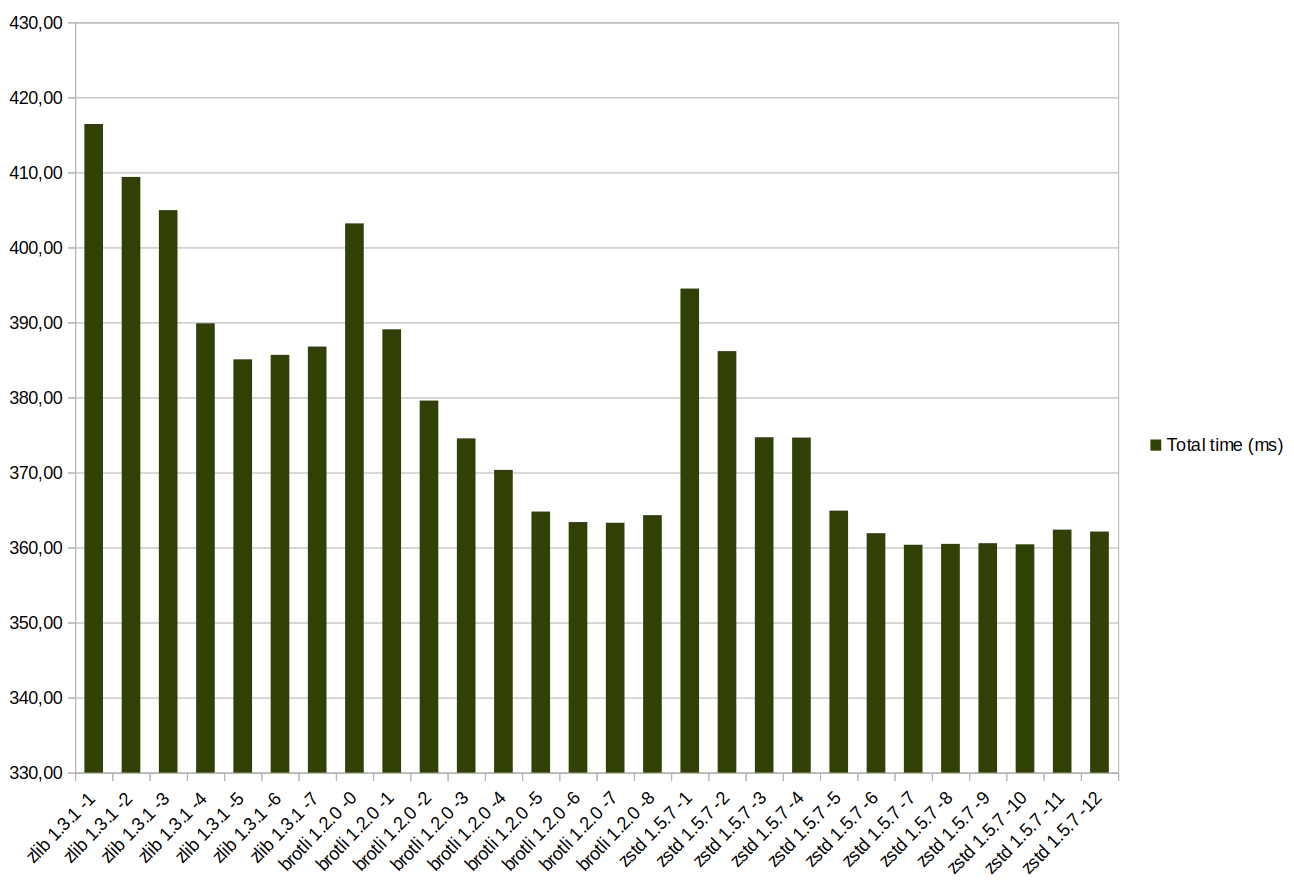
The same in table form:
| Compressor name/level | Compression speed (MB/s) | Ratio (%) | Total time (ms) |
| zlib 1.3.1 -1 | 101,35 | 39,58 | 416,45 |
| zlib 1.3.1 -2 | 97,59 | 38,84 | 409,40 |
| zlib 1.3.1 -3 | 91,37 | 38,33 | 404,97 |
| zlib 1.3.1 -4 | 75,97 | 36,61 | 389,88 |
| zlib 1.3.1 -5 | 67,64 | 35,97 | 385,08 |
| zlib 1.3.1 -6 | 56,54 | 35,74 | 385,67 |
| zlib 1.3.1 -7 | 51,55 | 35,68 | 386,79 |
| brotli 1.2.0 -0 | 648,31 | 39,11 | 403,21 |
| brotli 1.2.0 -1 | 511,76 | 37,66 | 389,08 |
| brotli 1.2.0 -2 | 295,42 | 36,57 | 379,58 |
| brotli 1.2.0 -3 | 257,88 | 36,02 | 374,55 |
| brotli 1.2.0 -4 | 192,31 | 35,47 | 370,34 |
| brotli 1.2.0 -5 | 130,44 | 34,67 | 364,79 |
| brotli 1.2.0 -6 | 115,28 | 34,43 | 363,39 |
| brotli 1.2.0 -7 | 95,35 | 34,24 | 363,30 |
| brotli 1.2.0 -8 | 78,68 | 34,12 | 364,32 |
| zstd 1.5.7 -1 | 832,85 | 38,31 | 394,52 |
| zstd 1.5.7 -2 | 739,07 | 37,46 | 386,18 |
| zstd 1.5.7 -3 | 632,15 | 36,29 | 374,70 |
| zstd 1.5.7 -4 | 610,81 | 36,28 | 374,65 |
| zstd 1.5.7 -5 | 292,53 | 35,13 | 364,91 |
| zstd 1.5.7 -6 | 226,18 | 34,73 | 361,91 |
| zstd 1.5.7 -7 | 204,83 | 34,53 | 360,36 |
| zstd 1.5.7 -8 | 166,53 | 34,43 | 360,48 |
| zstd 1.5.7 -9 | 161,21 | 34,42 | 360,58 |
| zstd 1.5.7 -10 | 136,01 | 34,29 | 360,43 |
| zstd 1.5.7 -11 | 96,99 | 34,19 | 362,38 |
| zstd 1.5.7 -12 | 99,46 | 34,19 | 362,13 |
Table 4. Total time for CSS.
In terms of total processing time, the mid-range levels brotli (5-7) or zstd (7-9) are optimal, with zstd slightly ahead of brotli. Under these conditions the transfer component makes the main contribution to the total time, which is why the ranking looks like this. Let's look at the same calculations for the JS file:
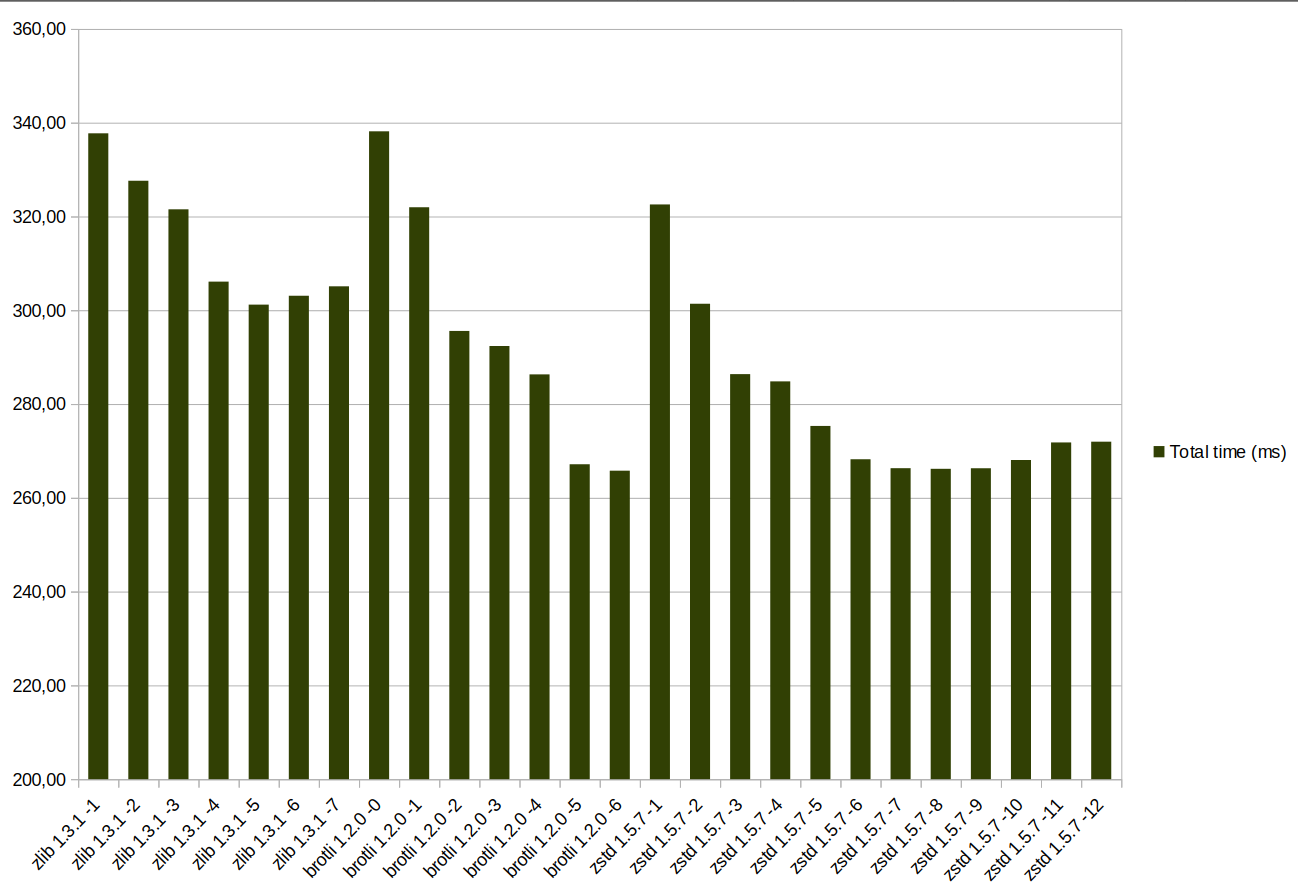
And in table form:
| Compressor name/level | Compression speed (MB/s) | Ratio (%) | Total time (ms) |
| zlib 1.3.1 -1 | 150,26 | 32,04 | 337,73 |
| zlib 1.3.1 -2 | 137,13 | 30,97 | 327,63 |
| zlib 1.3.1 -3 | 114,69 | 30,22 | 321,53 |
| zlib 1.3.1 -4 | 92,34 | 28,47 | 306,10 |
| zlib 1.3.1 -5 | 68,32 | 27,6 | 301,19 |
| zlib 1.3.1 -6 | 51,95 | 27,33 | 303,09 |
| zlib 1.3.1 -7 | 45,74 | 27,27 | 305,10 |
| brotli 1.2.0 -0 | 465,1 | 32,54 | 338,17 |
| brotli 1.2.0 -1 | 320,69 | 30,83 | 321,97 |
| brotli 1.2.0 -2 | 180,75 | 27,96 | 295,60 |
| brotli 1.2.0 -3 | 153,1 | 27,54 | 292,37 |
| brotli 1.2.0 -4 | 117,07 | 26,74 | 286,33 |
| brotli 1.2.0 -5 | 73,71 | 24,32 | 267,16 |
| brotli 1.2.0 -6 | 65,74 | 24,02 | 265,79 |
| zstd 1.5.7 -1 | 529,33 | 31,05 | 322,57 |
| zstd 1.5.7 -2 | 415,27 | 28,88 | 301,38 |
| zstd 1.5.7 -3 | 321,1 | 27,31 | 286,39 |
| zstd 1.5.7 -4 | 307,08 | 27,14 | 284,83 |
| zstd 1.5.7 -5 | 167,69 | 25,92 | 275,33 |
| zstd 1.5.7 -6 | 122,4 | 24,99 | 268,22 |
| zstd 1.5.7 -7 | 112,82 | 24,73 | 266,31 |
| zstd 1.5.7 -8 | 89,8 | 24,49 | 266,18 |
| zstd 1.5.7 -9 | 86,47 | 24,46 | 266,31 |
| zstd 1.5.7 -10 | 67,44 | 24,31 | 268,07 |
| zstd 1.5.7 -11 | 51,91 | 24,24 | 271,81 |
| zstd 1.5.7 -12 | 51,44 | 24,24 | 271,98 |
Table 5. Total time for JS.
The overall distribution is similar to the CSS case, but brotli 5–6 breaks into the lead thanks to the small file size. zstd 7–8 follows just behind. Of course, the testing was done on a CPU with high single-threaded performance.
When the parameters change (for example, channel bandwidth increases), the ranking will shift, because the transfer time component gets smaller and compression/decompression time carries more weight. The parameters can be changed in the spreadsheet from the repository.
As an example, consider a case with low CPU speed (roughly 2x lower — an Intel Core i5-8300H at about 2.0 Ghz) and a fast channel (12 MB/s, about 100 Mbit/s), keeping the resource size at 1 MB. The results are shown below.
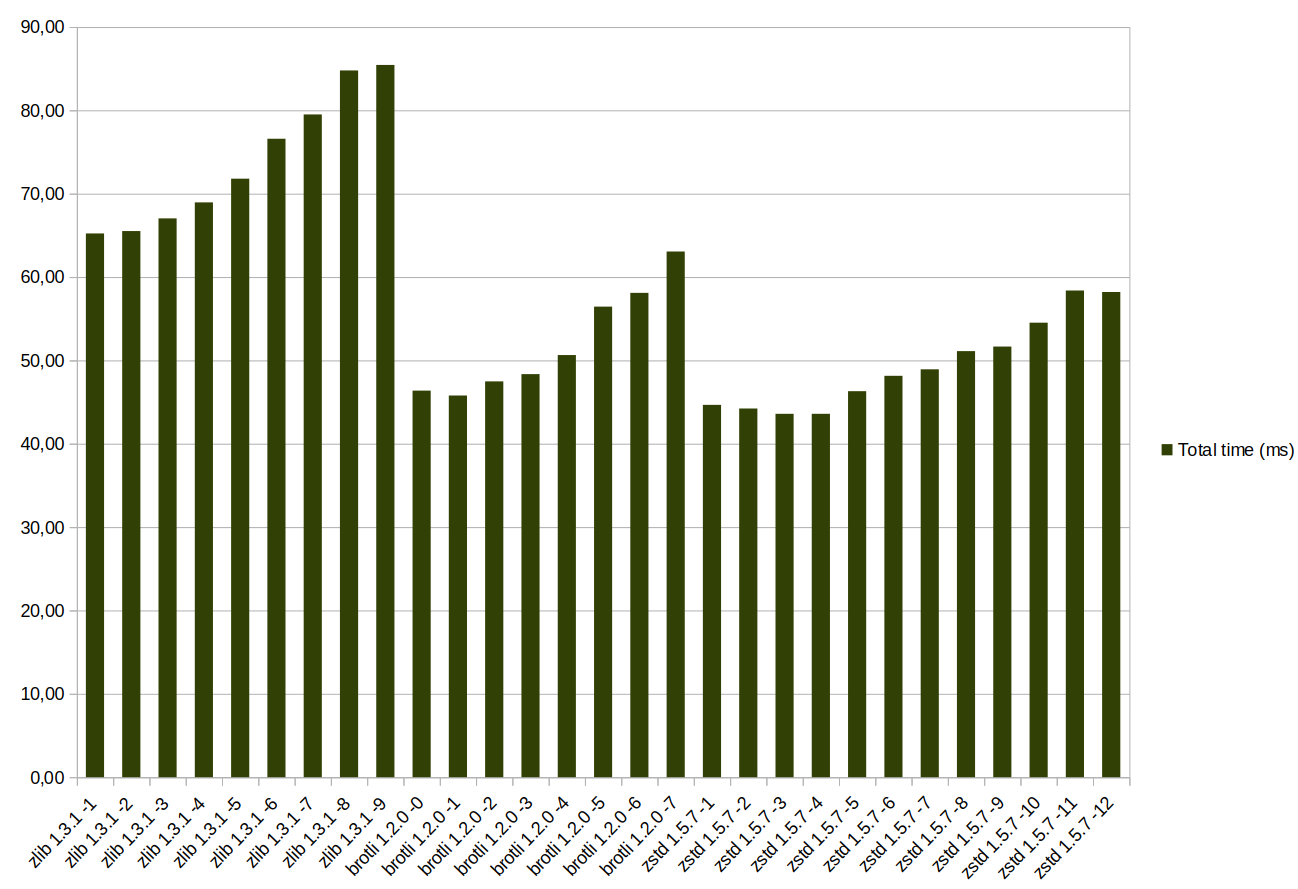
For the CSS file, the optimal settings by total transfer time are zstd 3–4; for brotli the best option is 0–1. Further increases in channel speed or decreases in CPU speed will shift the settings toward lower compression levels even more.
Summing up
The test results show a crushing defeat for gzip compression (zlib in the test). The only advantage of this compression format is compatibility: on both the client and web server side. Otherwise, brotli is in close competition with zstd. Depending on the dataset, one or the other comes out ahead. For static compression, brotli 11 will be the better choice in most cases.
Choosing dynamic compression settings is harder: the optimal choice depends on channel bandwidth and resource sizes. The most compatible recommendation: use mid-to-low compression settings with brotli and/or zstd (3–5). If the server has spare CPU resources, the levels can be raised by a few notches.