

Answering this question means going down a couple of levels — to the operating system and to the hardware. This account does not aim for absolute precision in every detail; the goal is to convey the general picture.
NIO under the hood
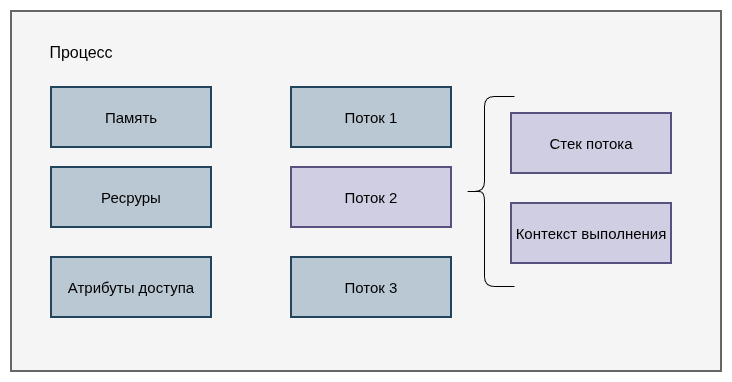
In an operating system, each process has its own memory, resources, access attributes (mandate), and a set of execution threads created within that process.
All threads work with shared memory, but each has its own call stack and execution context. By default, a thread's stack size is 8 MB.
Now let's look at the thread state model in an operating system:
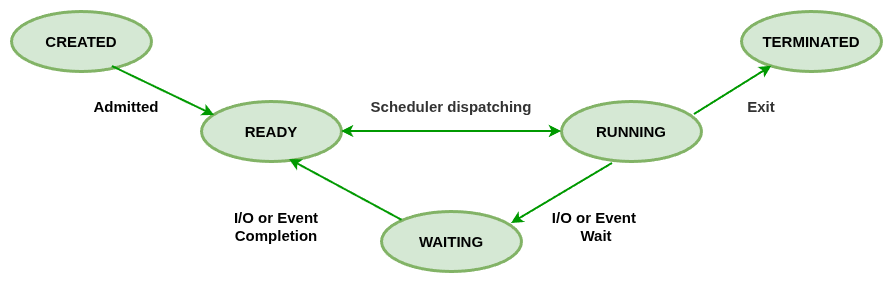
When an I/O call executes, the thread moves from the running state (RUNNING) to the waiting state (WAITNG). Once the data arrives, the thread moves to READY and can be scheduled for execution again by the operating system.
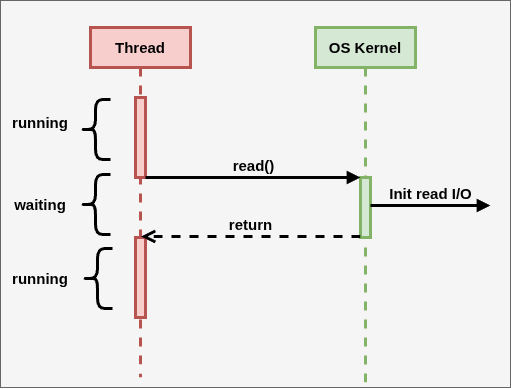
Here is the typical execution time of common operations:
| Operation | Typical time |
| execute a typical instruction on the CPU | 1/1,000,000,000 seconds = 1 nanosecond |
| data fetch from L1 cache | 0.5 nanoseconds |
| branch misprediction | 5 nanoseconds |
| data fetch from L2 cache | 7 nanoseconds |
| mutex lock / unlock | 25 nanoseconds |
| fetch from main memory | 100 nanoseconds |
| send 2 KB over the network at 1 Gbit/s | 20,000 nanoseconds |
| read 1 MB from SSD | 300,000 nanoseconds |
| thread context switch | 1000 — 10,000 nanoseconds |
The table shows that typical I/O operations (network or disk work) run 1000–10000 times slower than CPU operations. The time the CPU spends switching from one thread to another is comparable to the time an I/O operation takes.
Client–server applications built on blocking I/O frameworks usually settle on 200–400 threads. More threads degrade performance because of context-switching overhead. Too few worker threads means they eventually stall on I/O calls, and new clients stop being served or get served slowly — while the CPU itself stays underutilized.
That raises the question: can a process avoid blocking on an I/O call — just initiate it, keep working, and check from time to time whether the data is ready?
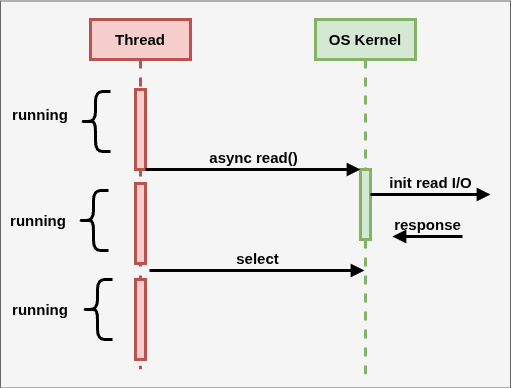
A faithful implementation of this scheme (one that does not want to keep the CPU busy) raises several important points that shape both the hardware-level solution and the runtime design of application languages:
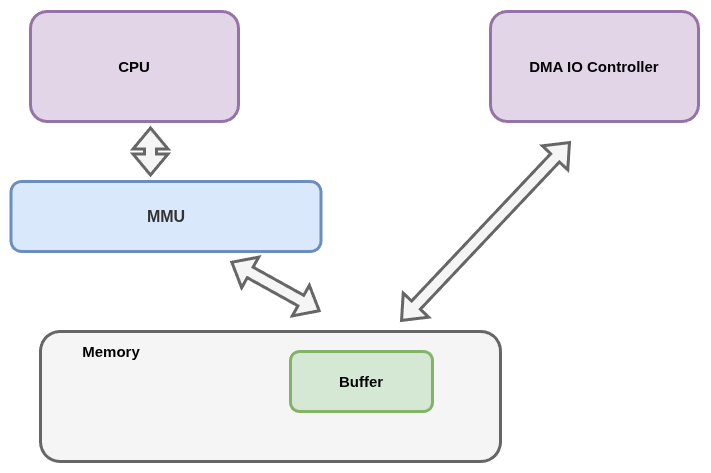
- an async I/O device must be able to work with RAM (data has to be read from somewhere or written somewhere);
- access to process memory is limited, so the async I/O buffer is allocated outside the process's main memory;
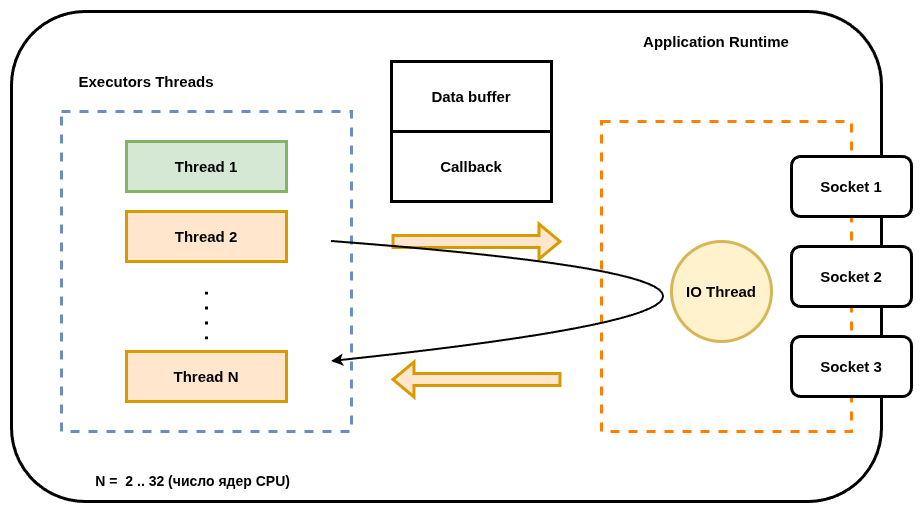
- in theory one thread could handle both async I/O and the follow-up business processing, but in that case we could not use all of the CPU's resources; so one thread is assigned to async I/O and a thread pool to business processing.
Making async I/O devices work with RAM required hardware support — the pairing of the CPU's Memory Management Unit (MMU) with the appearance of Direct Memory Access (DMA) controllers.
Note. If a buffer is created as a DirectBuffer, the JVM works with that buffer directly, with no extra data copying. This JVM technology for direct access to exchange buffers (located in off-heap memory) is called ZeroCopy. Otherwise, data gets copied between the buffer in RAM and JVM-managed memory.
The physical thread that runs the code after the data arrives is usually different from the thread that requested the I/O operation. The data still has to be processed somehow, so the exchange buffer has to travel together with a callback method that processes the received data. The buffer and the callback may be passed explicitly in application code, or hidden somewhere at the runtime level.
One caveat is worth remembering: operating systems limit async access to the file system. These limits are why Java NIO does not support non-blocking file operations, and why the Go scheduler handles network calls and disk accesses differently.
On Linux systems, Java NIO talks to the operating system kernel through the asynchronous I/O subsystem — the epoll call. Go uses a similar approach.
Using the async I/O subsystem does not require DMA devices; the kernel can emulate such behavior. Even so, hardware support delivers the best effect.
Asynchrony in Kotlin
The problem that asynchrony in Kotlin solves is of a different kind.
Note. What follows retells Roman Elizarov's talk (linked at the end); I recommend listening to the original. But if following links feels like a chore, reading this will do.
Suppose we have some business logic:
fun processTicket(ticket: Ticket): ProcessResponse {
    val flyInfo = service1.getFlywInfo(ticket)
    val userData = service2.getUserData(ticket, flyInfo)
    if (userData.isSpecial) {
        val userDataExtra = service3.getUserExtraData(userData)
        return computeExtraResponse(ticket, userData, userDataExtra)
    } else {
        return computeResponse(ticket, userData)
    }
}
Let's say we only call service3 every tenth time, but that service is very slow.
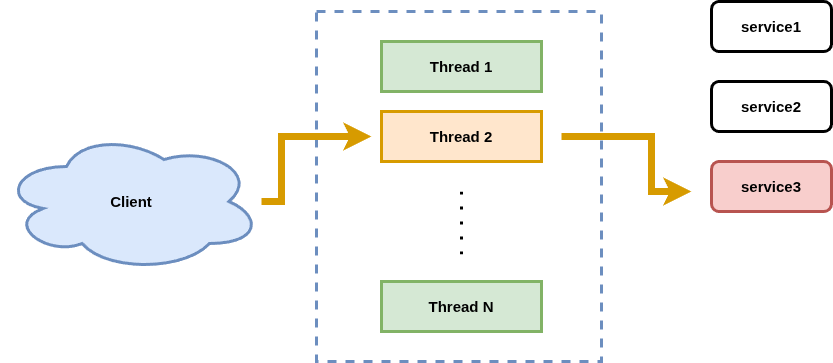
Under heavy load on our service, we eventually end up with every thread of our application waiting for a response from service3.
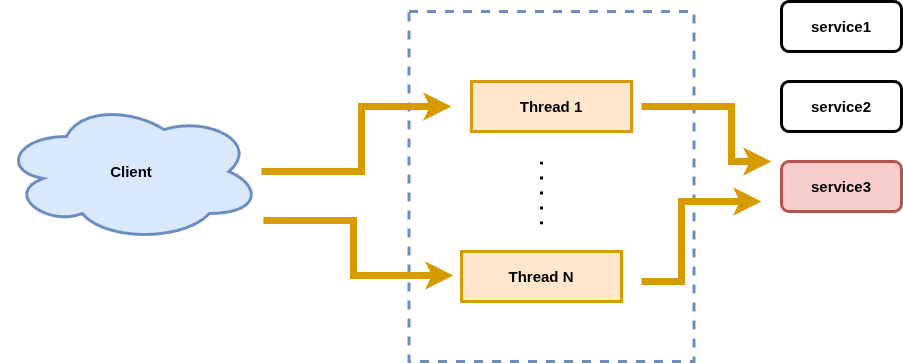
Not only do the clients get nervous — we can also take down service3!!!
So let's try to design our application so that calls to service3 go through a bounded thread pool.
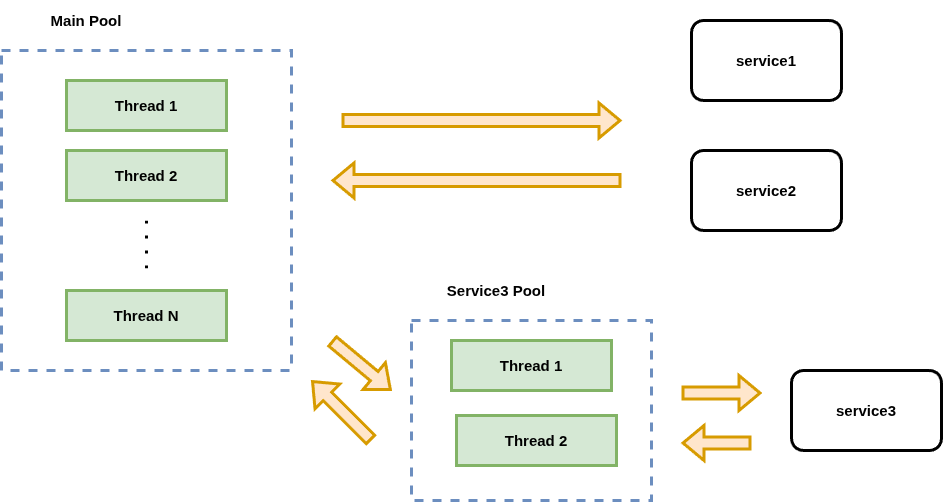
A great idea — but look at what happens to our code (this code is illustrative):
fun processTicket(ticket: Ticket): ProcessResponse {
    val flyInfo = service1.getFlywInfo(ticket)
    val userData = service2.getUserData(ticket, flyInfo)
    if (userData.isSpecial) {
        val result = Service3Pool.sumbit(
                () -> service3.getUserExtraData(userData)
            ).get()
        return result
    } else {
        return computeResponse(ticket, userData)
    }
}
Instead of clear code that solves the business problem, the async machinery now clutters the code with auxiliary constructs.
A couple more examples:
// Example function using coroutines
fun processTicket(ticket: Ticket): ProcessResult {
    val flyInfo = service1.getFlywInfo(ticket)
    val userData = service2.getUserData(ticket, flyInfo)
    return computeResponse(ticket, userData)
}
Synchronous code is clear and easy to follow. Try implementing async service calls on libraries like reactor and you get something like:
// Example function using RX - cluttered with extra functions
fun processTicket(ticket: Ticket): Future<ProcessResult> =
  service1.getFlywInfoAsync(ticket)
    .flatMap(flyInfo ->
  service2.getUserDataAsync(ticket, flywInfo))
    .map(userData -> computeResponse(ticket, userData)))
With callbacks it looks something like:
// Example using Callback - the logic is inverted
fun processTicket(ticket: Ticket): Callback<ProcessResult> =
    computeResponse(ticket, {
        service2.getUserData(ticket, {
            service1.getFlywInfo(ticket)
        })
    })
Even on such simple examples it is visible that async code either clutters the code with auxiliary constructs or turns the logic inside out.
Instead of solving the business problem, we start spending most of our time on technical questions.
Now let's look at the code with coroutines:
// Example function using coroutines
suspend fun processTicket(ticket: Ticket): ProcessResult {
➡    val flyInfo = service1.getFlywInfo(ticket)
➡    val userData = service2.getUserData(ticket, flyInfo)
     if (userData.isSpecial) {
➡        val userDataExtra = service3.getUserExtraData(userData)
     }
     return computeResponse(ticket, userData)
}
Except for the suspend modifier (the arrows are how the IDE highlights suspend function calls), the code looks synchronous!!! Switching between pools is handled by the compiler and the Kotlin runtime.
To repeat: Kotlin coroutines are a way to build an asynchronous application in which the developer focuses on business logic and writes code in a synchronous style.
Note. When developing GUI applications it is always important to free the main UI thread. That is a big part of why Kotlin became especially popular in Android development.
Conclusion
Asynchrony in NIO is the ability to use the operating system's async API.
Asynchrony in Kotlin is a transparent way to switch between thread pools, in which the developer focuses on business logic and the compiler and runtime take on all of the technical plumbing.
Asynchrony in Kotlin has no connection to asynchrony in NIO. If your library or framework is synchronous, the threads in the pool where the I/O call happens will still block. What Kotlin does offer is a good way to move such synchronous calls into a separate pool, taking over the thread-switching logic itself.
So to get the maximum effect we use:
- NIO-based frameworks (netty);
- NIO-based libraries for talking to services;
- ktor (CIO);
- move all legacy synchronous I/O libraries into a separate pool
and focus on business logic!!
References and acknowledgements
- Coroutines guide
- Coroutines in Kotlin on the server (Roman Elizarov, in Russian)
- NIO: between Scylla and Charybdis?
- The cost of operations in CPU cycles
- Async IO on Linux: select, poll, and epoll
- demo‑sockets‑io‑nio‑nio2
- kotlinx‑coroutines‑nio
- Scheduling In Go
- Building Highly Scalable Servers with Java NIO
- Non‑blocking I/O with regular files