
This article is an additional chapter to a guide to Mediastreamer2.
Chapter 8: Using the Lua Machine in Filters
Earlier we looked at filters whose behavior, after start-up, can only be partially controlled — by calling the methods they provide. This article builds a programmable filter whose behavior is defined entirely by the Lua machine embedded in it, or more precisely by the script loaded into that machine. This lets us change the filter's algorithm without recompiling the executable.
The code for this chapter can be downloaded from GitHub
Now for the practical implementation. Start by recalling how a new filter is created in chapter 4. In this scheme the source of the audio signal is either the line input of the sound card (sound_card_read) or a DTMF signal generator (dtmf_generator). The data then reaches the input of the Lua filter under development (lua_filter), which transforms it according to the script loaded into it. After that the data goes to a tee (Tee), which turns the input stream into two copies and puts them on two outputs. One of these streams goes to the recorder (recorder) and to the sound card for playback (sound_card_write). The recorder writes the data to disk in raw format (a wav file without a header). This way we can listen to and record the output of the Lua filter.
8.1 Implementing the filter
The Lua filter is built like this. When the filter is initialized, an instance of the Lua machine is created. Data movement through the filter is shown in figure 8.1.

A block of data arriving at the input is passed to the Lua machine through its stack using two global variables:
- lf_data — a long string holding the bytes of the data block;
- lf_data_len — an integer, the length of lf_data in bytes.
Once these two variables are placed on the stack, execution passes to the Lua machine. There the loaded script is activated and transforms the data string taken from the stack. The resulting data block is again placed into a long string, put into a global variable and then onto the stack. This uses another pair of global variables:
- lf_data_out — a string holding the bytes of the output data block;
- lf_data_out_len — an integer, the length of lf_data_out in bytes.
The filter then pulls the data off the stack and builds an output data block, which it puts on the filter output.
So a Lua filter lets us change the processing algorithm and the behavior of the media stream pipeline without recompiling and without stopping the main application — in other words, on the fly.
In practice, a text string of the appropriate size is what carries a block into the Lua machine and back. More elaborate ways of exchanging data can be implemented with User-Defined Types; their implementation is outside the scope of this guide.
Since the input block is known to consist of signed 16-bit samples, in the string the script receives each sample is encoded as two bytes in two's complement.
8.2 Script organization
The filter initially contains no executable Lua script; it has to be loaded into it. It makes sense to split the script into two parts. The first part performs the initial setup and runs once. The second part is for repeated, cyclic execution on every ticker tick. We call these parts:
- the script preamble — runs once, when the first tick arrives from the ticker;
- the script body — runs on every ticker tick (10 ms by default).
To load the preamble and the body, the filter provides the methods LUA_FILTER_SET_PREAMBLE and LUA_FILTER_RUN respectively.
8.2.1 Script preamble
This is Lua code that runs once: it loads libraries, declares the functions used by the script body, and performs the required initial setup of variables. Since the preamble runs on the first ticker tick, its code has to be defined before the ticker is started. For this we use the LUA_FILTER_SET_PREAMBLE method, whose first argument is the familiar pointer to the filter structure and whose second argument is the preamble text. The preamble can be written or overwritten any number of times, at any time. After each overwrite the preamble runs once on the next tick.
8.2.2 Script body
Unlike the preamble, this part of the script runs on every ticker tick (every 10 ms by default). This part of the code can be written or overwritten at any time. For this the LUA_FILTER_RUN method is defined, with arguments similar to the preamble.
8.2.3 Stopping the script
At any moment the script can be stopped (paused) with the LUA_FILTER_STOP method. After this method is called, incoming data blocks are passed straight to the filter output, bypassing script processing. To resume, call the LUA_FILTER_RUN method, passing a null pointer or a pointer to new text instead of the pointer to the script body text.
8.2.4 Helper functions
For the script to read data out of the string and put its results back into a string, we need two data access functions, get_sample() and append_sample(). The first extracts a signal sample from the string. The second appends a sample to a long string. Their code is given in listing 8.1.
Listing 8.1: Data access functions
-- funcs.lua

-- This function extracts one 16-bit sample from the string.
function get_sample(s, sample_index)
local byte_index = 2*sample_index - 1
local L = string.byte(s, byte_index)
local H = string.byte(s, byte_index + 1)
local v = 256 * H + L
if (H >= 128) then
v = - ((~(v - 1)) & 65535)
end
return v
end

-- This function appends one 16-bit sample to the string.
function append_sample(s, sample_value)
local v = math.floor(sample_value + 0.5)
if v < 0 then
v = - v
v = ((~v) + 1) & 65535
end
local H = v // 256
local L = v - H * 256
return  s .. string.char(L, H)
end
The get_sample() function is used to access the signal samples stored in the string. It returns one 16-bit sample extracted from string s. Given the sample index sample_index, it determines the indices of the two bytes in which the sample is stored. Those two bytes are then assembled into a 16-bit number. Since a sample is a signed number, the bytes store it in two's complement, so the value has to be brought back to its normal form. First check the state of bit 15 of the number. If it is 0, the number is positive and no conversion is needed. If the bit is set, the number is negative: subtract one from the number, invert every bit, and multiply by −1.
The append_sample() function is used to build the output data string. It appends two bytes to its first argument (the string) that represent the second argument (the signal sample) in two's complement.
The file with these functions is called funcs.lua; put it in the directory from which the filter code will run.
8.2.5 Example script
Let's create a script that simply passes data through itself without changing it.
The preamble is shown in listing 8.2:
Listing 8.2: Script preamble
-- preambula2.lua
-- This script runs in the Lua filter as the preamble.
-- Load the file with the data access functions.
require "funcs"
preambula_status = 0
body_status = 0 -- This variable is incremented in the script body.
local greetings = 'Hello world from preambula!\n' -- Greeting.
print(greetings)
return preambula_status
The preamble loads the file with the signal data access functions (funcs.lua).
The script body is given in listing 8.3:
Listing 8.3: Script body
-- body2.lua
-- This script runs in the Lua filter as the script body.
-- Move the result into the output variables.
lf_data_out =""
if lf_data_len == nil then
print("Bad lf_data_len.\n")
end
for i = 1, lf_data_len/2 do
s = get_sample(lf_data, i)
lf_data_out = append_sample(lf_data_out, s)
end
lf_data_out_len = string.len(lf_data_out)
return body_status
Nothing special happens in the script body: samples are copied one by one from the input string to the output string. Clearly, any sample transformation can be placed between get_sample() and append_sample(). Another option is a filter that does not process samples at all but can drive other filters according to the input data.
One thing to keep in mind: when writing scripts it is convenient to put a comment containing the file name on the first line, as the examples do. If an error occurs, the diagnostic message will start with the file name where the error was found, so it becomes clear which part of the script is meant.
-- preambula2.lua
Filter <LUA_FILTER> Lua error. Lua error description:<[string "-- preambula2.lua ..."]:12: attempt to perform arithmetic on a nil value>.
8.3 Filter source code
The filter header file looks like this:
Listing 8.4: Lua filter header file
#ifndef lua_filter_h
#define lua_filter_h
/* Include the header with the enumeration of mediastreamer filters. */
#include <mediastreamer2/msfilter.h>
/* Include the Lua interpreter. */
#include <lua5.3/lua.h>
#include <lua5.3/lauxlib.h>
#include <lua5.3/lualib.h>
/*
Define a numeric identifier for the new filter type. This number must not
match any of the other types. In mediastreamer the file allfilters.h
contains the corresponding enum MSFilterId. Unfortunately there is no clear
way to determine the maximum occupied value other than looking in this
file. So we take a value that is certainly larger for our filter id:
4001.   Assume that the developers adding new filters will not
reach this number soon.
*/
#define LUA_FILTER_ID 4001
/* Name of the global variable in which the filter function puts the input
data block. */
#define LF_DATA_CONST       "lf_data"
/* Name of the global variable in which the filter function puts the size of the input
data block.*/
#define LF_DATA_LEN_CONST   "lf_data_len"
/* Name of the global variable in which the filter function puts the output
data block.*/
#define LF_DATA_OUT_CONST   "lf_data_out"
/* Name of the global variable in which the filter function puts the size of the output
data block.*/
#define LF_DATA_OUT_LEN_CONST "lf_data_out_len"
/* Flag indicating that the filter input queue is empty. */
#define LF_INPUT_EMPTY_CONST "input_empty"
/* Define the filter constants. */
#define LF_DATA             LF_DATA_CONST
#define LF_DATA_LEN         LF_DATA_LEN_CONST
#define LF_DATA_OUT         LF_DATA_OUT_CONST
#define LF_DATA_OUT_LEN     LF_DATA_OUT_LEN_CONST
#define LF_INPUT_EMPTY      LF_INPUT_EMPTY_CONST
/*
Define the methods of our filter. The second macro parameter must be the
sequence number of the method, a number from 0.  The third parameter is the
type of the method argument whose pointer is passed to the method on call.
*/
#define LUA_FILTER_RUN        MS_FILTER_METHOD(LUA_FILTER_ID,0,char)
#define LUA_FILTER_STOP         MS_FILTER_METHOD(LUA_FILTER_ID,1,int)
#define LUA_FILTER_SET_PREAMBLE MS_FILTER_METHOD(LUA_FILTER_ID,2,char)
/* Define the exported variable that will
hold the characteristics for this filter type. */
extern MSFilterDesc lua_filter_desc;
#endif /* lua_filter_h */
Here the macros with the names of the global variables in the Lua machine context are created, and the three filter methods mentioned above are declared:
- LUA_FILTER_RUN;
- LUA_FILTER_STOP;
- LUA_FILTER_SET_PREAMBLE.
We will look at only the important part of the filter source code, namely the work of the control_process() method (the full source code is given in appendix A). This method runs the Lua machine on every ticker tick. Its code is shown in listing 8.5.
Listing 8.5: Method control_process()
static void
control_process(MSFilter *f)
{
ControlData *d = (ControlData *)f->data;
mblk_t *im;
mblk_t *out_im = NULL;
int err = 0;
int i;

if ((!d->stopped) && (!d->preabmle_was_run))
{
    run_preambula(f);
}

while ((im = ms_queue_get(f->inputs[0])) != NULL)
{
    unsigned int disabled_out = 0;
    if ((!d->stopped) && (d->script_code) && (d->preabmle_was_run))
    {
      bool_t input_empty = ms_queue_empty(f->inputs[0]);
      lua_pushinteger(d->L, (lua_Integer)input_empty);
      lua_setglobal(d->L, LF_INPUT_EMPTY);

      /* Put the data block from the filter input onto the Lua machine stack. */
      size_t sz = 2 * (size_t)msgdsize(im); /* Block size in bytes.*/
      lua_pushinteger(d->L, (lua_Integer)sz);
      lua_setglobal(d->L, LF_DATA_LEN);

      lua_pushlstring(d->L, (const char *)im->b_rptr, sz);
      lua_setglobal(d->L, LF_DATA);

      /* Remove from the stack everything that may be left there. */
      int values_on_stack;
      values_on_stack = lua_gettop(d->L);
      lua_pop(d->L, values_on_stack);

      /* Run the script body. */
      err = luaL_dostring(d->L, d->script_code);

      /* Handle the result of the execution. */
      if (!err)
      {
          int script_body_status = lua_tointeger(d->L, lua_gettop(d->L));
          if (script_body_status < 0)
          {
              printf("\nFilter <%s> bad script_body_status: %i.\n", f->desc->name,
                     script_body_status);
          }

          /* Extract the size of the output data block; it may have changed. */
          lua_getglobal(d->L, LF_DATA_OUT_LEN);
          size_t real_size = 0;
          char type_on_top = lua_type(d->L, lua_gettop(d->L));
           // printf("Type on top: %i\n", type_on_top);
          if (type_on_top == LUA_TNUMBER)
          {
              real_size =
                  (size_t)lua_tointeger(d->L, lua_gettop(d->L));
              // printf("------- size from lua %lu\n", real_size);
          }
          lua_pop(d->L, 1);

          /* Extract the long string with the transformed data of the input block
           and pass it on. */
          lua_getglobal(d->L, LF_DATA_OUT);
          size_t str_len = 0;
          if (lua_type(d->L, lua_gettop(d->L)) == LUA_TSTRING)
          {
              const char *msg_body = lua_tolstring(d->L, -1, &str_len);
              if (msg_body && str_len)
              {
                  size_t msg_len = real_size / 2;

                  out_im = allocb((int)msg_len, 0);
                  memcpy(out_im->b_wptr, msg_body, msg_len);
                  out_im->b_wptr = out_im->b_wptr + msg_len;
              }
          }
          lua_pop(d->L, 1);

          /* Read out and discard everything that may be left on the stack. */
          values_on_stack = lua_gettop(d->L);
          lua_pop(d->L, values_on_stack);
      }
      else
      {
          printf("\nFilter <%s> Lua error.\n", f->desc->name);
          const char *answer = lua_tostring(d->L, lua_gettop(d->L));
          if (answer)
          {
              printf("Lua error description:<%s>.\n", answer);
          }
      }
    }
    mblk_t *p = im;
    if (out_im)
        p = out_im;

        for (i = 0; i < f->desc->noutputs; i++)
        {
          if ((!disabled_out) && (f->outputs[i] != NULL))
          if (p)
              ms_queue_put(f->outputs[i], dupmsg(p));
        }

    freemsg(out_im);
    freemsg(im);
}
}
When the control_process() method gets control, it checks whether there is data at the filter input and sets the global variable LF_INPUT_EMPTY, so that the script can handle the situation where there is no input data if necessary. Then, if there is data at the input, it starts reading it just like any other filter. Each block is 160 samples or 320 bytes by default, but the block size is determined explicitly. The result is put on the Lua machine stack and from there into the global Lua variable lf_data_len (an integer). After that the method puts the data block itself onto the stack as well, and from there into the global variable lf_data (a long string). Control then passes to the Lua machine, which is done by calling the function:
luaL_dostring(d->L, d->script_code)
The machine starts executing the script loaded earlier. Once the script has run, the results of its work are transferred from the Lua machine's context into the method.
8.4 Test application
With the Lua filter implemented, it is time to build a test application for it. To check the filter under development we use the scheme shown in figure 8.2.

Figure 8.2: Test scheme for the Lua filter
The application works as follows. After start-up, when the scheme of filters is already in memory but the clock sources have not been activated yet, the filter initialization procedure begins. It consists of running each filter's init() method. The filter being created is no exception, but besides the mandatory actions its init() also runs the Lua preamble code that performs the initial setup of the Lua machine. When starting the program we must pass it the path to the preamble file using the command line key "scp". The other part, the script body, is passed with the key "scb". The full list of the program's keys is given in listing 8.6.
Listing 8.6: Command line keys of the test application
--help      List of options.
--version   Version of application.
--scp       Full name of containing preambula of Lua-script file.
--scb       Full name of containing body of Lua-script file.
--gen       Set generator's frequency, Hz.
--rec       Make recording to a file 'record.wav'.
The source code of the test application is given in appendix B. Earlier, at the start of the chapter, a link was given through which this source code can be downloaded and built following the instructions in the file
README.md
An example of starting the test application:
$ ./lua_filter_demo --scb ../scripts/body2.lua --scp ../scripts/preambula2.lua --gen 600
After start-up, a 600 Hz tone is heard in the headphones for 10 seconds. This means the signal went through the filter.
8.5 Example of using the filter
As an example, let's write a script that starting from sample 5000 (i.e. 5/8 of a second) multiplies the input signal by a low-frequency sinusoid (i.e. amplitude-modulates it) for 2 seconds. Then the signal becomes unmodulated again.
Listing 8.7: Preamble of the modulator script
-- preambula3.lua
-- This script runs in the Lua filter as the preamble.
-- Load the file with the data access functions.
require "funcs"
preambula_status = 0
body_status = 0 -- This variable is incremented in the script body.
-- Variables for the calculations.
samples_count = 0
sampling_rate = 8000
low_frequency = 2 -- Modulating frequency.
phase_step = 2 * math.pi / sampling_rate * low_frequency
return preambula_status
The modulation is implemented as follows:
Listing 8.8: Body of the modulator script
-- body3.lua
-- This script runs in the Lua filter as the script body.
-- The script modulates the input signal.
lf_data_out =""
if lf_data_len == nil then
print("Bad lf_data_len.\n")
end
for i = 1, lf_data_len/2 do
s = get_sample(lf_data, i)
if (samples_count > 5000)  and (samples_count < 21000) then
output_s = s * math.sin( phase_step * samples_count )
else
output_s = s
end
samples_count = samples_count + 1
lf_data_out = append_sample(lf_data_out, output_s)
end
lf_data_out_len = string.len(lf_data_out)
return body_status
Start the application with the new script:
$ ./lua_filter_demo --scb ../scripts/body3.lua --scp ../scripts/preambula3.lua --gen 1200 --rec
After five seconds, press Enter to stop the program. The recording can then be played back with a standard audio player:
$ aplay -t raw --format s16_be --channels 1 ./record.raw
Convert the output file to wav format:
$ sox -t raw -r 8000 -b 16 -c 1 -L -e signed-integer ./record.raw ./recording.wav
To plot the signal in gnuplot, it has to be converted into a file with two data columns. The same sox utility does this, paired with grep:
$ sox ./recording.wav -r 8000 recording.dat && grep -v «^;» recording.dat > clean_recording.dat
Next we pass the resulting recording.wav file to the gnuplot utility:
$ gnuplot -e "set terminal png; set output 'recording.png'; plot 'clean_recording.dat' using 1:2 with lines"
Figure 8.3 shows the result of the script.
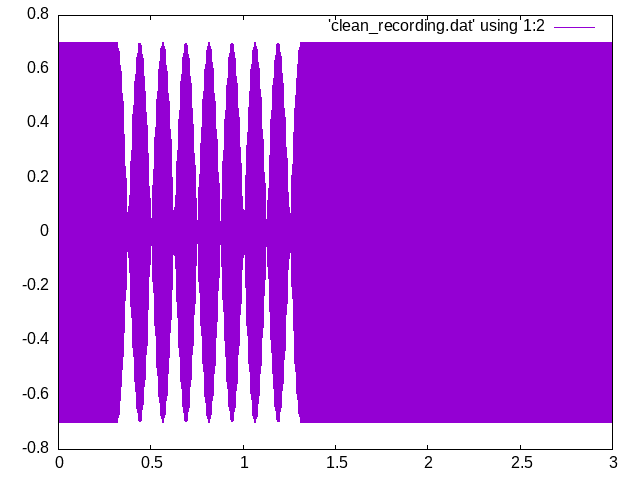
In the figure we see the envelope of the sinusoidal signal after it passed through the filter. For about 5/8 of a second the signal amplitude stayed unchanged; then the branch of the script with the modulation algorithm kicked in:
output_s = s * math.sin( phase_step * samples_count)
and for a second the output carried the modulated signal. After that the script turned the modulation off and the signal was passed on to the output without modulation.