
When designing applications that use databases, you often run into situations where concurrent access to data is required. The consequences can vary widely: the database state may be corrupted, or some data may be lost. To prevent this, there are various ways to control access to resources. This article covers two of them: optimistic and pessimistic locking.
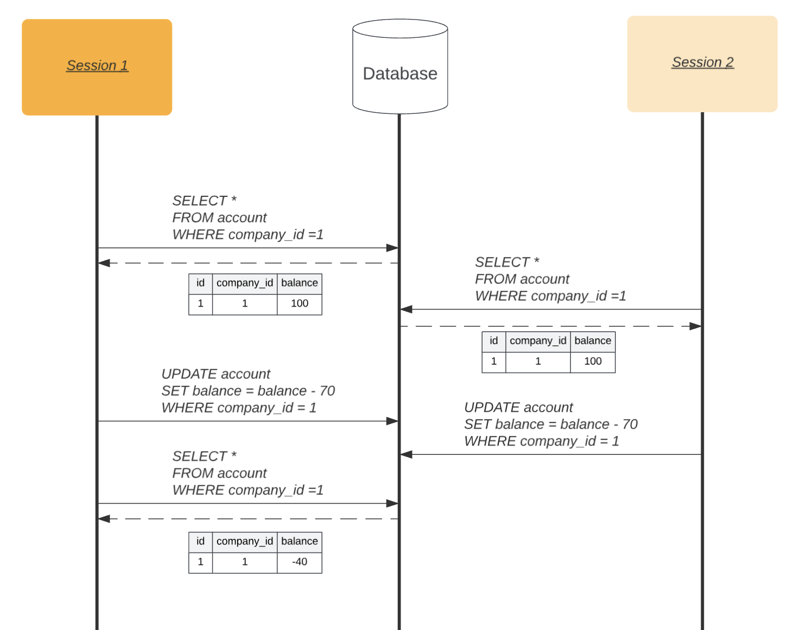
Consider a situation where two users working with the same application try to update the same record at the same time:
As you can see, the first user fetches a record from the accounts table and tries to withdraw $70 based on the data they received. At the same time, the second user performs exactly the same operation, also relying on a read they just made from the database. After both updates, the account ends up with a negative balance. That is exactly what this article is about. How do you prevent such situations at the database level?
In MySQL 8, such situations are handled by two mechanisms: pessimistic or optimistic locking.
Pessimistic locking
With this kind of locking, other users are not allowed to perform any operations on tables or individual rows until the current transaction finishes. Unlike optimistic locking, this mechanism is built into the database itself, and it is what gives us exclusive access to a resource. Locks come in two types: exclusive and shared. Since the example above involves individual rows in the database, I will focus only on locking rows rather than whole tables. Note that whole tables and individual rows can be locked in parallel.
Lock types
Shared lock
A shared lock applies in transactions only when different users read the same record. No other transactions can be applied to that record at that moment; in particular, it cannot be modified or deleted.
You acquire this type of lock by adding FOR SHARE at the end of each data selection query, for example:
START TRANSACTION;
SELECT * from accounts WHERE owner_id = 1 FOR SHARE;
# doing something
COMMIT;
Ending the transaction with COMMIT or ROLLBACK releases the lock on all affected rows. If another transaction tries to acquire an exclusive lock on the same record, it has to wait until the shared lock is released.
Exclusive lock
This kind of lock prevents not only modifying but also reading the locked records. If someone in another transaction tries to take a shared or exclusive lock on these rows, they have to wait until the current lock is released.
To take an exclusive lock, we add FOR UPDATE at the end of a selection query, for example:
START TRANSACTION;
SELECT * from accounts WHERE owner_id = 1 FOR UPDATE;
# doing something
COMMIT;
If such a record is fetched within another transaction where no locking is used, it will be returned, but no operations on it are possible until the lock is released.
How to lock a range of rows
The example above showed how to lock individual records. MySQL also allows locking whole ranges of data. For example, SELECT * FROM <accounts> WHERE id > 1 FOR UPDATE locks every record with an id greater than 1 and does not allow new records to be inserted into the database.
If you try to lock a range that contains no records (max id = 10, and you are trying to lock id > 100), another transaction can take a different lock on that range.
Such a lock can be taken not only by identifier but by other criteria as well:
SELECT * FROM <user> WHERE first_name = 'John' FOR UPDATE
The query above locks every row matching first_name = John. It is now forbidden to fetch such a row or to insert a new one that has the specified value in the corresponding column.
Other locking options
For the queries described above — more precisely, for the FOR SHARE and FOR UPDATE conditions — two more options can be added. The first is NOWAIT. It does not let the query wait for the currently locked rows to free up, and throws an error if the data cannot be fetched immediately. The second is SKIP LOCKED. With it, a query can fetch only the rows that are not currently locked by other transactions.
Here is, for example, how these options can be used:
SELECT * FROM user WHERE first_name = 'John' FOR UPDATE NOWAIT
SELECT * FROM user WHERE first_name = 'John' FOR UPDATE SKIP LOCKED
Lock waits
When using pessimistic locking, you sometimes get situations where several threads try to fetch and lock the same row. If the rows are not released within the allotted time (MySQL allows 50 seconds by default), the waiting transactions throw errors like this:
[40001][1205] Lock wait timeout exceeded; try restarting transaction
Optimistic locking
Optimistic locking is not provided in MySQL as a feature. With this strategy, we take a version number of the record we are interested in and check whether it has changed since the data was updated. For example, suppose our accounts table has an extra column: version.
We fetch the record from the database with this query:
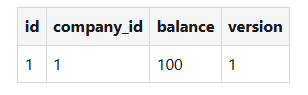
SELECT * FROM account WHERE id = 1;
Then, when we want to update the record, we work off the version column, for example:
UPDATE account SET balance = balance - 70, version = version + 1 WHERE id = 1 AND version = 1
In the UPDATE condition — more precisely, in its WHERE part — we use the version number we fetched in the query.
This approach guarantees the following: if another thread manages to update the record after we fetched it from the database, our update will not go through, because the version numbers will differ. That is the essence of optimistic locking: if the operation ends up updating exactly one row, the operation can be considered successful. If no row was updated, an exception can be thrown at the application level, or the situation can be handled some other way.
The version number does not have to be an integer. Dates or checksums can serve just as well.
Which locking option to choose?
When you have to pick a locking strategy while working with MySQL, the decision usually depends on the specific practical case and the application's requirements.
Pessimistic locking is a good fit for situations that involve batch processing, especially when many consumers are involved. In cases where every row has to be processed, it is critical to prevent several consumers from picking the same row at the same time. Using the FOR UPDATE SKIP LOCKED condition guarantees that exactly one consumer locks and processes the row. Meanwhile, the others skip it and move to the next available row. This helps keep data integrity and avoid conflicts in batch processing scenarios.
On the other hand, optimistic locking may be preferable when the risk of side effects from repeating an operation is low. It is especially appropriate when the application does not call any external APIs or send messages while running. In such cases, potential conflicts from optimistic locking are unlikely to have serious consequences. Optimistic locking allows data access and modification to happen concurrently across many transactions at once, so it improves the efficiency and performance of the work.
Conclusion
The choice between pessimistic and optimistic locking depends on factors such as the expected level of contention for resources, the importance of maintaining data integrity, and the application's performance requirements. Optimistic locking is preferable when conflicts are rare and, most importantly, efficiency is what matters. Pessimistic locking, on the other hand, guarantees data integrity, but in highly contended environments it can affect performance. So choosing a locking strategy requires a good understanding of your application's characteristics and requirements.