
Programming is not only about algorithms and logic; it is also about the remarkable diversity of language syntax. While building a new syntax highlighter for llamafile, developer Justine Tunney studied 42 programming languages — from classic C and exotic Tcl to powerful Ruby.
Justine shares what she found about how quirky and unpredictable lexical syntax can be. Trigraphs in C, a leftover tool for keyboards with a limited character set; fixed string lengths in FORTRAN; nested comments in Haskell; strings with double square brackets in Lua. Ruby turned out to be nearly the hardest language to highlight because of its context-dependent syntax.
Below is a description of how the tool was built, along with a look at how programming languages solve the same problems in different ways. If you care about syntax, language quirks, and the messiness of lexical analysis, this is for you.
This month I studied 42 programming languages to build a new syntax highlighter for llamafile. Today I will share some of the strangest, and at times creepiest, syntaxes I have ever seen.
The languages I picked: Ada, Assembly, BASIC, C, C#, C++, COBOL, CSS, D, FORTH, FORTRAN, Go, Haskell, HTML, Java, JavaScript, Julia, JSON, Kotlin, ld, LISP, Lua, m4, Make, Markdown, MATLAB, Pascal, Perl, PHP, Python, R, Ruby, Rust, Scala, Shell, SQL, Swift, Tcl, TeX, TXT, TypeScript, and Zig. This list covers nearly every language in the TIOBE index, except Scratch, which cannot be highlighted because it uses blocks instead of text.
How to write code for syntax highlighting
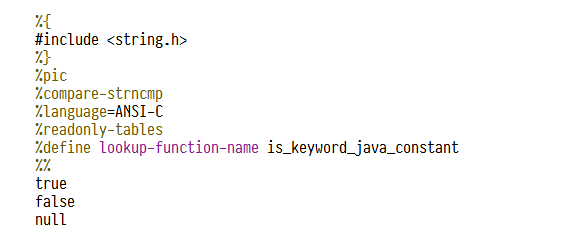
Implementing syntax highlighting is actually easy. You could probably write something like this very quickly — in the time it takes to finish a job interview, say. My favorite tools for it are C++ and GNU gperf. The hardest part is avoiding a pile of string comparisons to decide whether something is a keyword. Most developers just use a hash table, but gperf lets you build a perfect one. For example:
gperf was originally developed for GCC, and it is a great way to squeeze the most out of it. If you run gperf on the code above, it generates this .c file. You will notice that its hash function only has to look at a single character to get a collision-free lookup. That is what makes it perfect from a performance standpoint. I am not sure anyone needs to highlight C at 35 MB per second, but I can do it now, even though I defined about 4000 keywords for that language. Thanks to gperf, those words do not slow things down.
The rest is finite state machines. For a basic highlighter you do not need flex, bison, or ragel. You just need a for loop and a switch statement. At least that was the case for me, when I only cared about strings, comments, and keywords. If I wanted to highlight things like C function names, I would probably need a real parser. But focus on the essentials and you are only doing lexical analysis. See the highlight_ada.cpp file for an example.
Demo
Everything you are about to read on this page served a single purpose: building the new llamafile syntax highlighter. That is probably llamafile's biggest advantage over ollama so far, since ollama does no highlighting at all. Here is a demo of it running on Windows 10 with the Meta LLaMA 3.2 3B Instruct model. Note that these llamafiles also run on macOS, Linux, FreeBSD, and NetBSD.
The new interface with highlighting and a chat bot made llamafile so pleasant to use (and open-weight models like gemma 27b are quite good these days) that I find myself reaching for Claude less and less often.
Examples of strange lexical syntax
So let's talk about the kinds of lexical syntax that surprised me while writing my highlighter.
C
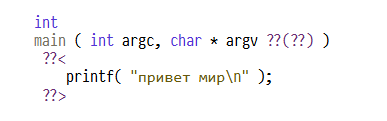
Even though C claims to be simple, it has some of the strangest lexical elements of any language. First, there are trigraphs, probably invented to help Europeans use C on keyboards that lacked #, [, \, ^, {, |, }, and ~. You can substitute ??=, ??(, ??/,??), ??, ??<, ??!, ??>, and ??-. Very intuitive notation, right? This means that code like the following is perfectly valid C.
At least it was, until trigraphs were removed in the C23 standard. But compilers will keep supporting this syntax for legacy software, so a good syntax highlighter has to support it too. And if trigraphs are officially dead, that does not mean standards committees have not invented some other strange syntax to replace them.
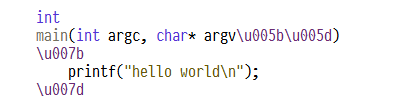
Consider universal characters:
This feature is for people who want, say, variable names with Arabic characters while keeping the source code clean ASCII. I do not quite understand who needs this. I was hoping I could use it and write:
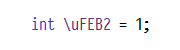
But no: if universal characters are not used in certain UNICODE planes approved by the standards committee, GCC reports an error.
Next up is one of my favorites. Did you know a one-line comment in C can span several lines if you put a backslash at the end of the line?
Most other languages do not support this. Even languages that allow backslash escaping in their source code (Perl, Ruby, and Shell) do not support this C feature. As far as I know, only Tcl and GNU Make do. Highlighters like Emacs and Pygments often get it wrong. Vim, on the other hand, seems to always handle the backslash correctly.

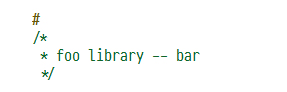
Here is another good example of an Emacs mistake: the null preprocessor directive. One of the first things you notice when reading v6 source code is that most .c files start like this:
Presumably this was done to work around some quirks, but this code is still relevant today. It can even be put to good use, such as hiding comments from cc -C -E:
Haskell

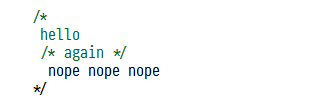
Every C programmer knows you cannot put a multiline comment inside a multiline comment. For example:
But you can in Haskell. They finally fixed the bug. Though they had to adopt a different syntax for it.
D
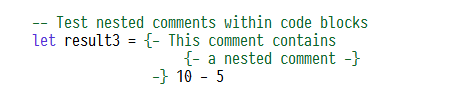
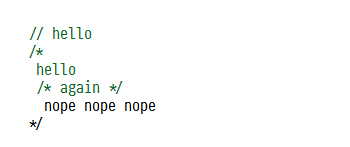
You might think D was the first to fix C's recursive comment bug. Instead, D adopted both of C's comment syntax forms as-is:
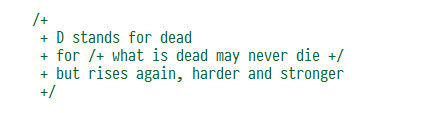
While introducing a third comment syntax type, for comment recursion.
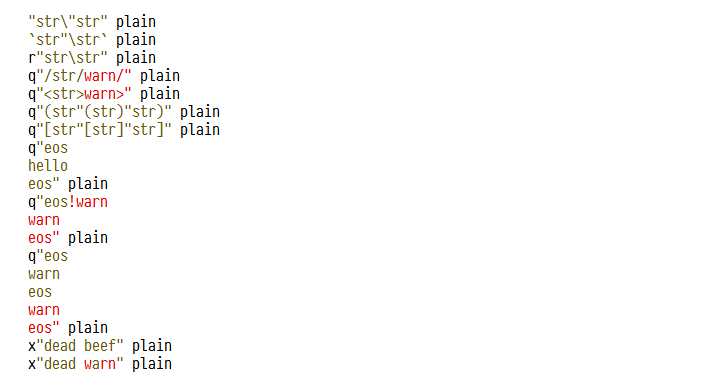
In my opinion, D documented its lexical syntax better than any other language. It is formalized, and it lays out every detail I needed to know, such as hexadecimal strings and heredocs.
Tcl
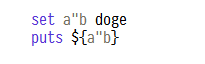
What surprised me most about Tcl is that identifiers can contain quotes. For example, this program prints a"b:
You can even put quotes inside variable names, but you can only reference them with the ${a"b} notation, not $a"b.

JavaScript
JavaScript has a built-in lexical syntax for regular expressions. It is easy to get wrong if you are not careful. Consider this example:
When I first wrote my lexer, I just looked for the closing slash and assumed every slash inside the regular expression would be escaped. But when I tried to highlight minified code, it turned out that is not the case. If the slash sits inside a character class, it does not need to be escaped.

Now for even stranger things.
There are a few invisible UNICODE characters called LINE SEPARATOR (u2028) and PARAGRAPH SEPARATOR (u2029). I have no idea where these code points might be useful, but the ECMAScript standard defines them as line terminators, which effectively makes them equal to \n. Since they are Trojan Source characters, I configured my Emacs to render them as ↵ and ¶. Most software ignores them, though, and often displays them as question marks. As far as I know, no language except D does this. I was able to use this for SectorLISP, because it let me build C + JavaScript polyglots.
syntax highlighting javascript//¶`
That is how I embed C code into JavaScript files.

syntax highlighting C//¶`
And that is how I embed JavaScript into C source code. One piece of working code where I did this is the file lisp.js, which I link from my SectorLISP blog post. It runs in a browser, and you can also compile it with GCC and run it locally. llamafile highlights this kind of code correctly, but I have yet to find another highlighter that does the same. It hardly matters, since I doubt any LLM will ever generate such code. Still, it is fun to think about these tricky cases.

Shell
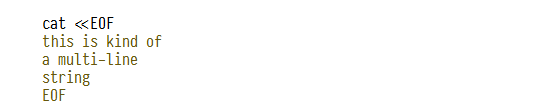
We all know the heredoc syntax in Shell scripts, for example
This syntax lets you put $foo inside a heredoc string, though there is a quoting form that disables variable substitution.
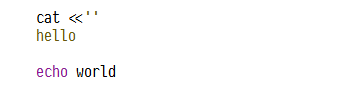
If you want to confuse your colleagues, a great way to abuse this syntax is to replace the heredoc delimiter with an empty line. Then the heredoc ends at the next blank line. For example, this program prints "hello" and "world" on two lines:

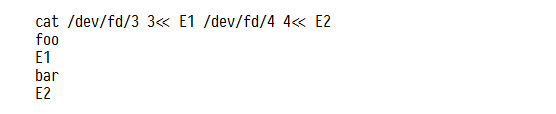
In languages that support heredocs (Shell, Ruby, and Perl), you can also put several heredocs on one line.
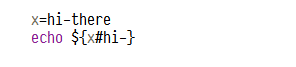
One more thing to watch for when working with shell: it is like Tcl in that special characters like #, which you would think always start a comment, can actually be valid code depending on context. Inside a variable reference, for example, # can be used to strip a prefix. The following program prints the word "there".
String interpolation
Did you know that, from a highlighter's point of view, a Kotlin string can start with " and end with {? That is how this language's string interpolation syntax works. Many languages let you splice variable references into strings, but TypeScript, Swift, Kotlin, and Scala take string interpolation to an extreme, encouraging real code to be embedded inside strings.
So highlighting strings in Kotlin, Scala, and TypeScript means tracking braces and maintaining a parser state stack. In TypeScript it is relatively simple — you only need to add a couple of states to your state machine. In Kotlin and Scala it is much harder, because they support both double- and triple-quoted syntax, and either can hold interpolated values. The result was about 13 separate states the state machine needs just to lex strings. Swift also supports triple quotes for interpolated syntax "\(var)", but it took only 10 states to handle.

Swift
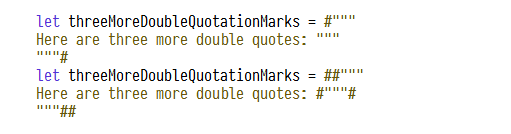
Swift takes its own approach to embedding a string inside a string. It lets you wrap "double-quoted" strings, """triple-quoted""" strings, and /regular-expressions/ in any number of #hash# markers that must be mirrored on both sides. That allows code like this:
C#
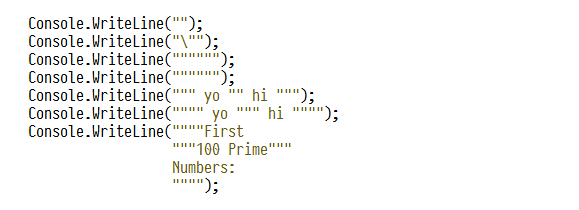
C# supports Python's triple-quoted multiline string syntax, with one twist that is unique to the language. C# solves the "string inside a string" problem by letting you use four or even five quotes if you want. However many quotes you put on the left side, that many are used to end the string at the other end.
In my opinion that is how it should be, because it is easier for a state machine to decode. Classic Python triple-quoted strings need extra rules to make sure you have either one double-quote character or exactly three. Allowing an arbitrary number of quotes means fewer rules to check. The result is a more capable and more expressive language that is simpler to implement. That is exactly what we have come to expect from Microsoft.
What will they think of next?
FORTH
Usually the easier code is for a computer, the harder it is for a human to read, and FORTH is a clear example. FORTH is probably the simplest language that exists, because it treats everything delimited by whitespace as a token. Even the start-of-line syntax is a token. For example:
means the same as saying "hello world" in any other language.

FORTRAN and COBOL
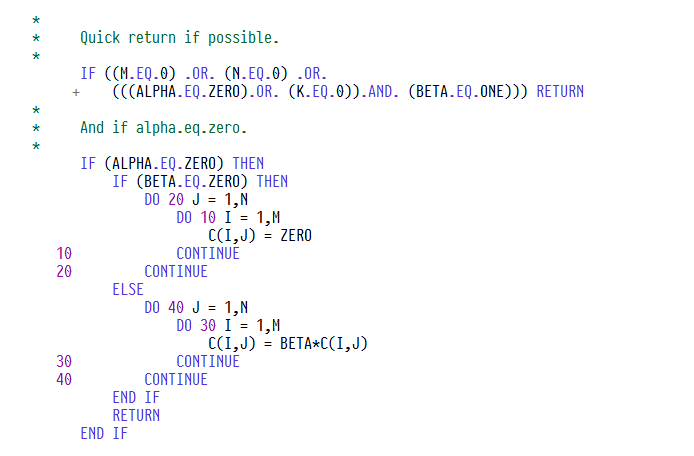
One use case I imagine for llamafile is keeping a banking system from collapsing when all the FORTRAN and COBOL programmers retire. Say you have just been hired to maintain a secret mainframe full of confidential information, written in COmmon Business-Oriented Language. With llamafile you can ask a locally run AI system such as Gemma 27b to write COBOL and FORTRAN code for you. It cannot print punch cards, but it can highlight punch-card syntax. Here is FORTRAN code with correct syntax highlighting:
FORTRAN has these fixed-column rules:
- If you put
\*,c, orCin column 1, the line becomes a comment - A non-space character in column 6 lets the line extend beyond 80 characters
- Labels are created by placing digits in columns 1-5
Now some COBOL code with correct syntax highlighting:
COBOL follows these rules:
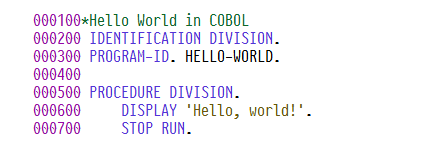
- Putting
\*in column 7 turns the line into a comment - A
-in column 7 lets the line extend beyond 80 characters - Line numbers go in columns 1-6
Zig
Zig has a unique solution for multiline strings: they are marked with two backslashes.
What I like about this syntax is that it removes the need to call textwrap.dedent(), the way you have to with Python triple-quoted strings. The downside is that the semicolon looks ugly. This is string syntax that really ought to be tried in one of the languages that do not require semicolons, such as Go, Scala, Python, and so on.

Lua
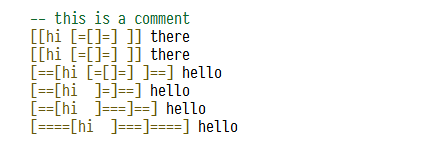
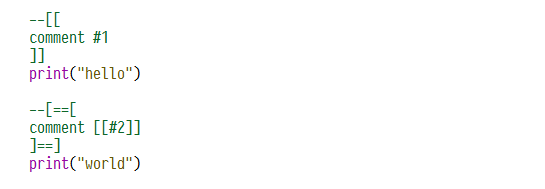
Lua has a unique multiline string syntax, and it uses an approach similar to C# and Swift for the "string inside a string" problem. It relies on double square brackets with an arbitrary number of equals signs between them.
What is really interesting is that it works with comments too.
Assembler
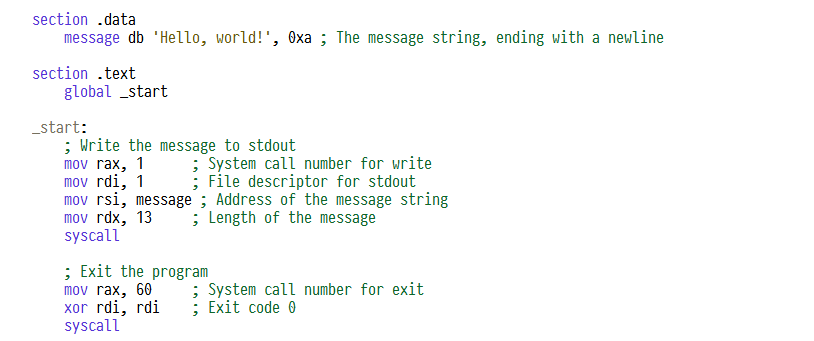
One of the hardest languages to highlight is assembler, because of how fragmented all its different dialects are. I tried to build something in llamafile that handled AT&T, nasm, and related syntax reasonably well. Here is nasm syntax:
And AT&T syntax:
And GNU syntax:
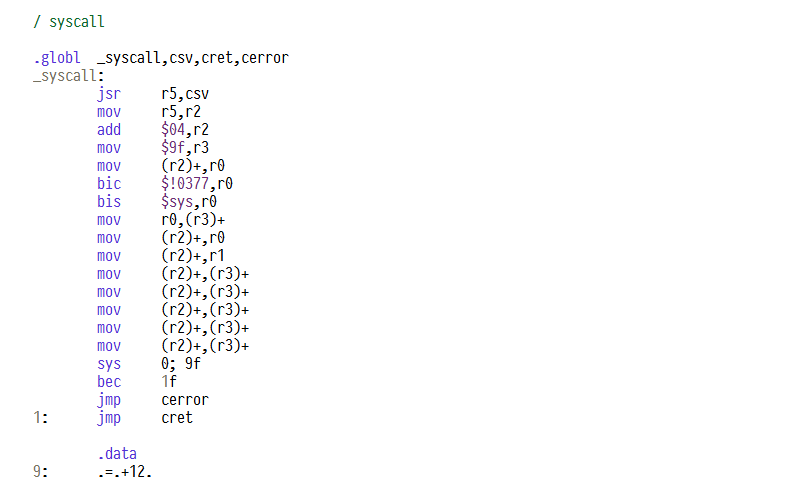
When dealing with keywords, I found the simplest approach is to treat the first identifier on a line (not followed by a colon) as the keyword. With that, most of the assembler code I tried looked reasonable.
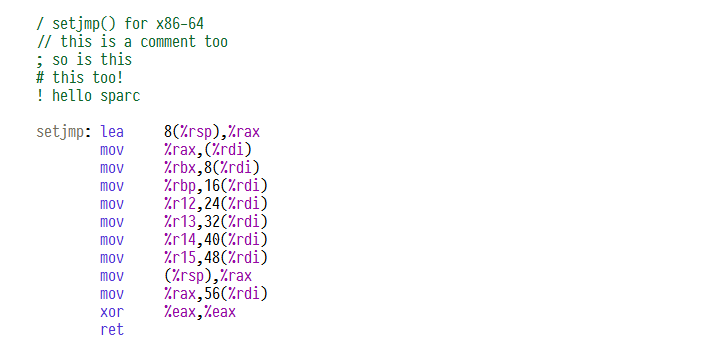
Comment syntax is very complicated. I like the original UNIX comments, which needed only one slash. GNU assembler still supports them today, but only at the start of a line (in UNIX assembler they could originally go anywhere, because assembler could not do arithmetic back then). Clang does not support fixed-form comments at all, so using them in open source is no longer practical.
It gets more interesting from there. Another quirk of the original UNIX assembler is that character literals did not use a closing quote. Where we write 'x' to get 0x78 for the character x, original UNIX source code writes 'x. GNU assembler still supports this quirk, but LLVM does not. Either way, a lot of code uses this syntax, so any good highlighter has to support it.
GNU assembler lets you quote identifiers, so you can put almost any character into an identifier.
Finally, highlighting assembler code is not just a matter of highlighting assembler. Assembler is usually combined with the C preprocessor or m4. Believe me, this comes up often across a lot of open source programs. So lines starting with dnl, m4_dnl, or C must also be treated as comments.
Ada
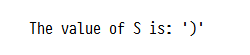
Ada is surprisingly easy to lex. But there is one thing I still have not fully figured out: the use of single quotes. Ada can have character literals like C, for example 'x'. But a single quote can also reference attributes, as in Foo'Size. A single quote can even take expressions and call functions. For example, the following code:
prints:
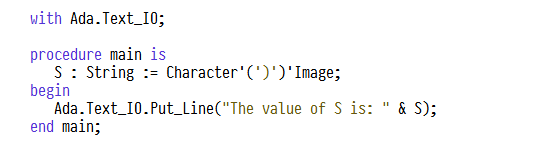
because we declare a character, assign it a value, and then pass it through the Image function, which converts it to a String representation.
BASIC
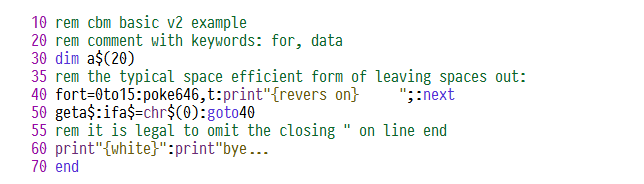
Let's talk about BASIC (Beginner's All-purpose Symbolic Instruction Code). While digging through repositories I had cloned into git, I came across this old Commodore BASIC program that broke many of my assumptions about syntax highlighting.
Note that this particular BASIC implementation does not require a closing quote in strings, variable names carry these odd sigils, and keywords like goto are easy to tell apart from identifiers.
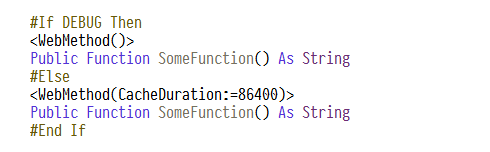
Visual BASIC also has a strange date literal syntax:
That is hard to lex, because VB even has preprocessor directives.

Perl
Perl is one of the hardest languages to highlight. It sits somewhere between shells and programming languages and inherits the complexity of both. Perl is not as popular as it used to be, but its influence is still large. In Perl, regular expressions became a first-class construct, and the way regexes work in Perl has since been copied by many other languages, including Python. The lexical syntax of regular expressions itself is still quite unique.
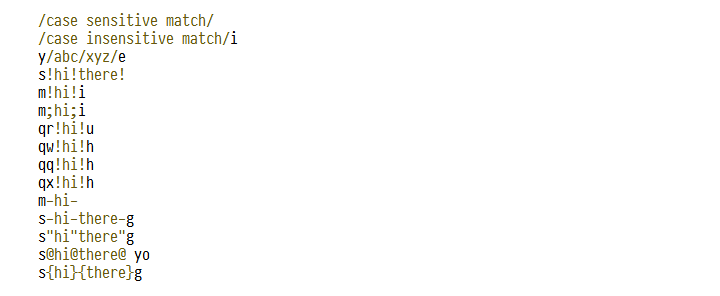
For example, in Perl you can substitute text, like the sed stream editor, like this:
Like sed, Perl lets you replace the slashes with arbitrary punctuation characters, which makes it easier to insert slashes into a regular expression.

You may not have known this works with mirrored characters too; in that case you need to insert an extra character:

But s/// is not the only oddity that has to be lexed as a string. Perl has plenty of other magic prefixes.

The difficulty in lexing such constructs is that you need context, so you do not accidentally mistake y/x/y/ for a division expression. Fortunately this is fairly easy in Perl, because variables can always carry sigils: $ for scalars, @ for arrays, and % for hashes.
That saves us from having to parse the language's grammar.
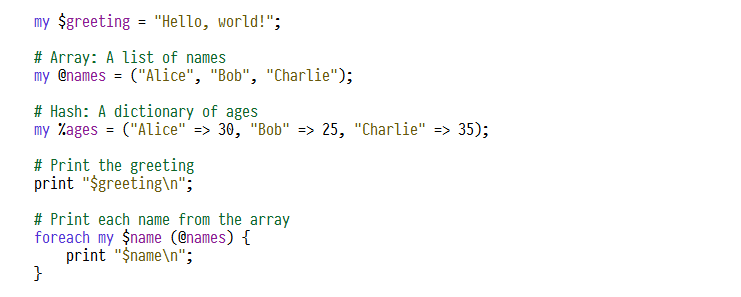
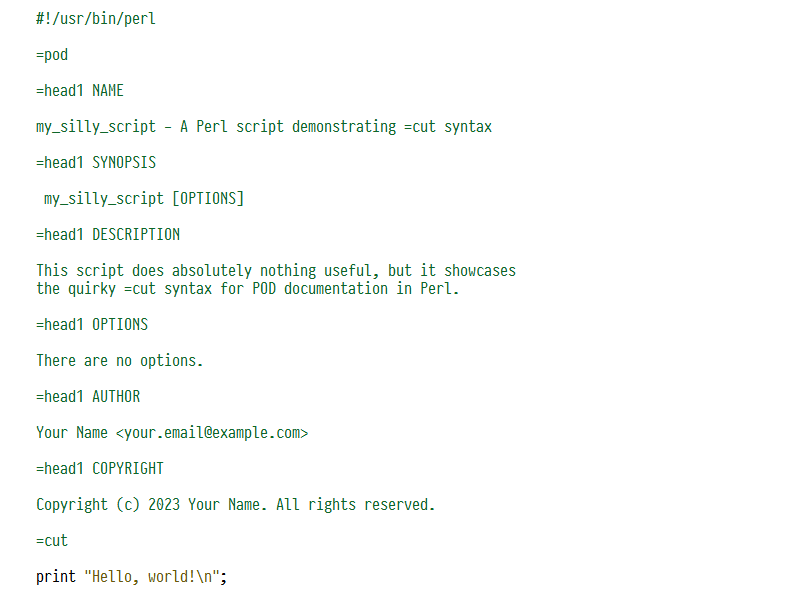
Perl also has a strange convention for writing man pages inside source code. In short, any =word at the start of a line marks the start of a page, and =cut marks its end.
Ruby
I saved the most interesting language for last: Ruby. Here is a language whose syntax slips away from every attempt to understand it. Ruby is a mash-up of all the earlier languages, and it is not even formally documented. The language's reference has a section on Ruby syntax, but it is quite brief. Whenever I test highlighting by concatenating every .rb file on disk, there is always some file that finds a way to break it.
Since Ruby supports backtick syntax, for example var =`echo hello`, I do not quite understand how to determine that the backtick above should not be highlighted as a string. Here is another example:

Ruby has the << operator as well as heredoc support (like Perl and Shell). So I do not quite understand how to tell that the code above is not a heredoc. And yes, this code really exists. Even Emacs handles it incorrectly. Of all 42 languages I studied, this one probably shocked me the most. Maybe this is a case where you cannot lex Ruby without a full parse. I am not sure even a parse can sort it out.

But wait, it gets more interesting. In fact, this is valid Ruby code:
That's it.

Complexity of the supported languages
If I ranked programming languages by how many lines of code their highlighter takes, FORTH would be the simplest language and Ruby the hardest.
132 highlight_m4.cpp
219 highlight.cpp
220 highlight_go.cpp
239 highlight_ld.cpp
263 highlight_r.cpp
337 highlight_js.cpp
449 highlight_c.cpp
521 highlight_d.cpp
1042 highlight_ruby.cpp